Ori Becker · Product design leader · Former audio engineer · New York area
I design software that has to keep working while it changes.
Four pieces of work, one screen each, then the rest of the portfolio. Scroll for the short version. Every one opens into the full story, with the screens, the decisions and what they cost.
0
years of product design, B2B software
0
design teams built from zero
0
AI agents I run in production
Case 1 of 4 · monday.com · Workflows · 2022 to 2023
monday.com had two ways to automate work. I made them one.
Board rules and app connections had been separate products for years, each with its own builder and its own logs. I designed one builder that handles both, rolled it out so nobody's existing automations changed until they chose to move them, and shipped it without breaking a single live one.
2→1
builders. Two products became one
0
customer automations broken at launch
0
of apps (Slack, Salesforce, Gmail) that plug into the same builder
Case 2 of 4 · ZoomInfo Lite · Onboarding and activation
We asked new users what they came to do. The order of the options was answering for them.
With our default order, 67% of new users picked search and 6% picked upload a list. Randomize the order and measure again: search 51%, upload 20%. Same analytics, minus our own bias. Upload got a real flow instead of a buried button, and new users reaching a first real search went from 46% to 63%.
67→0%
chose search once the order was random. Our default had inflated it
Case 3 of 4 · Sagely · Namogoo, later Wandz.ai · ZoomInfo
Two design teams built from zero. One rebuilt.
At Sagely I was the first designer on a shopping assistant used by 40 million people a month. At Namogoo I hired from one to eight and built the company's first design system. At ZoomInfo I rebuilt an existing team; once the screens could actually ship, conversion tripled.
Sixteen AI agents next to my team. They learn every week.
Every week each agent reads one fresh resource, writes what is new and what it will do differently, and proposes a change to its own playbook. I approve or reject the changes in one thirty-minute review. When an agent invented numbers once, the incident became a rule every agent reads at start-up.
ReadReportPropose a diffWeekly reviewPlaybook updated
Building something that has to keep working? Let's talk.
Product design leader, based in the New York area. Before design I was an audio engineer, and it still shapes the work: listen before you touch the mix, respect timing, and know the difference between signal and noise.
monday.com · Workflows · 2022 to 2023 · Product design
monday.com had two ways to automate work. I made them one.
Board rules and app connections had been separate products for years. This is how they became one builder, without breaking a single live automation.
2→1
builders. Two products became one
0
customer automations broken at launch
Q3→Q4
builder shipped in Q3, templates followed in Q4
The situationAutomations handled anything on a board. Integrations handled anything in a connected app. Same customers, two builders, two vocabularies, two run logs. Every attempt to merge them had failed.
What I didFound one sentence both products could speak (when, if, then), designed a single builder around it, made the switch opt-in with a designed migration, and fought to keep templates in the plan.
What happenedThe unified builder shipped with no live workflow broken. Adoption came from people moving their own automations across. Templates landed one quarter later, as promised.
Two products. Two builders. Two logs.
AutomationsRules on a board: a status changes, an item is created, a date arrives.
IntegrationsEvents in apps: Slack, Salesforce, Gmail, HubSpot, hundreds more.
One builderwhen · if · then
The problem
The pain was in the hand-off between the products, not inside either builder.
An ops manager with one rule in mind, say a deal closing in Salesforce should notify the team and create an onboarding item, built half of it in each product and stitched the halves together with a helper column used as a wire. When it broke, nobody could tell which half.
More detail: how I mapped it
Before touching the builder I mapped the journey with product, engineering and support in the room, stage by stage: what people were trying to do, what they actually did, what they were thinking, and which systems they touched.
Years of attempts to merge the two products had not shipped. Each one tried to replace the system. The map showed something more specific: the individual builders were fine. The cost was concentrated in three stages, switching products, stitching the halves together, and debugging across two logs.
1 · IntentOne rule in mindOpens the board looking for "automate".
2 · DiscoverTwo entry pointsSame idea, different names.
4 · Switch productsA second mental modelA second recipe syntax, a second auth flow.
5 · StitchA column as a wireA hidden dependency nobody understands six months later.
6 · Run and debugWhich half broke?Two logs, no single run view. Support reconstructs it.
7 · MaintainForty recipes, no inventoryRename a column and both recipes break silently.
Pain concentrates in stages 4 to 6. The full map, with what people said, did and touched, is in the Figma file.
The screens
Eight screens, one rule being built.
Step through the builder the way a customer meets it: an empty canvas, a trigger, a condition, an app step, a blocked publish, and the finished rule reading back as a sentence. The numbers on each screen are explained on the right.
1 of 8
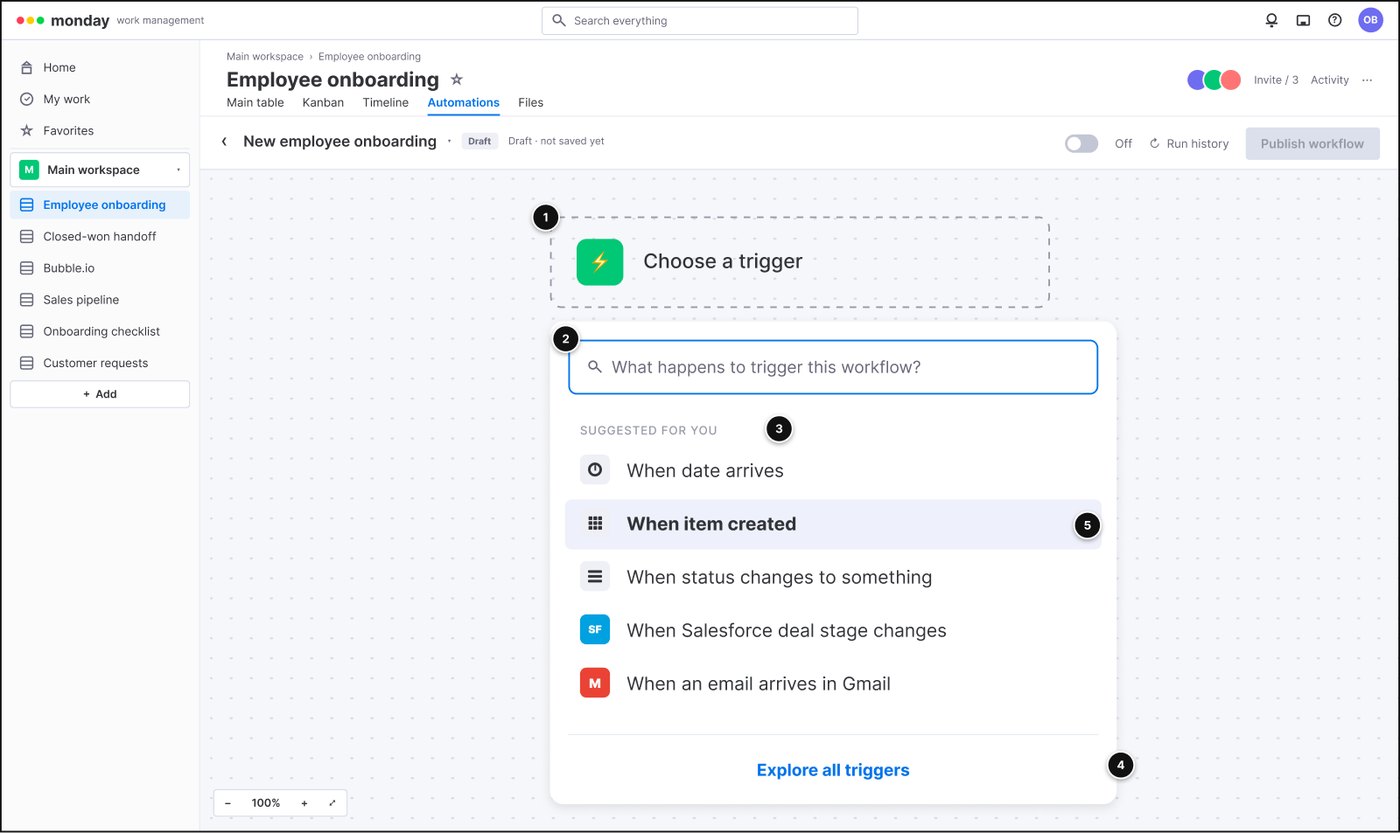
Start with one slot, not a blank page
1The canvas opens with a single "Choose a trigger" slot.
2You search by what happens, in plain words.
3Suggestions first, so most people never search.
4Everything else behind one "Explore all triggers" link.
5Board events and app events sit in the same list. "When item created" is next to "When Salesforce deal stage changes".
2 of 8
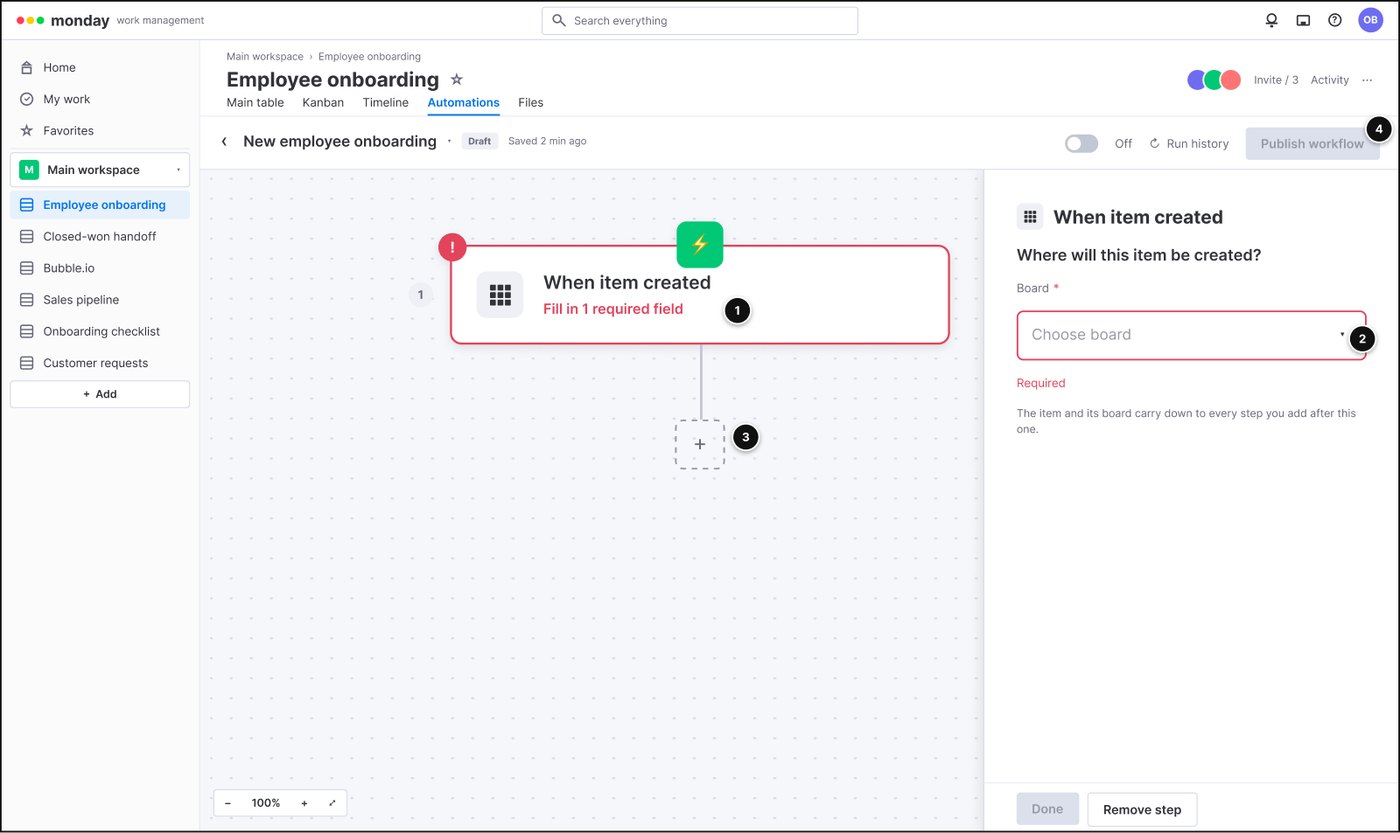
The step asks for what it needs
1The card says exactly what is missing: "Fill in 1 required field".
2Settings live in a side panel; required fields are marked, and the panel explains why (the board carries down to every step).
3The next slot is already waiting.
4Publish stays off until the workflow is valid.
3 of 8
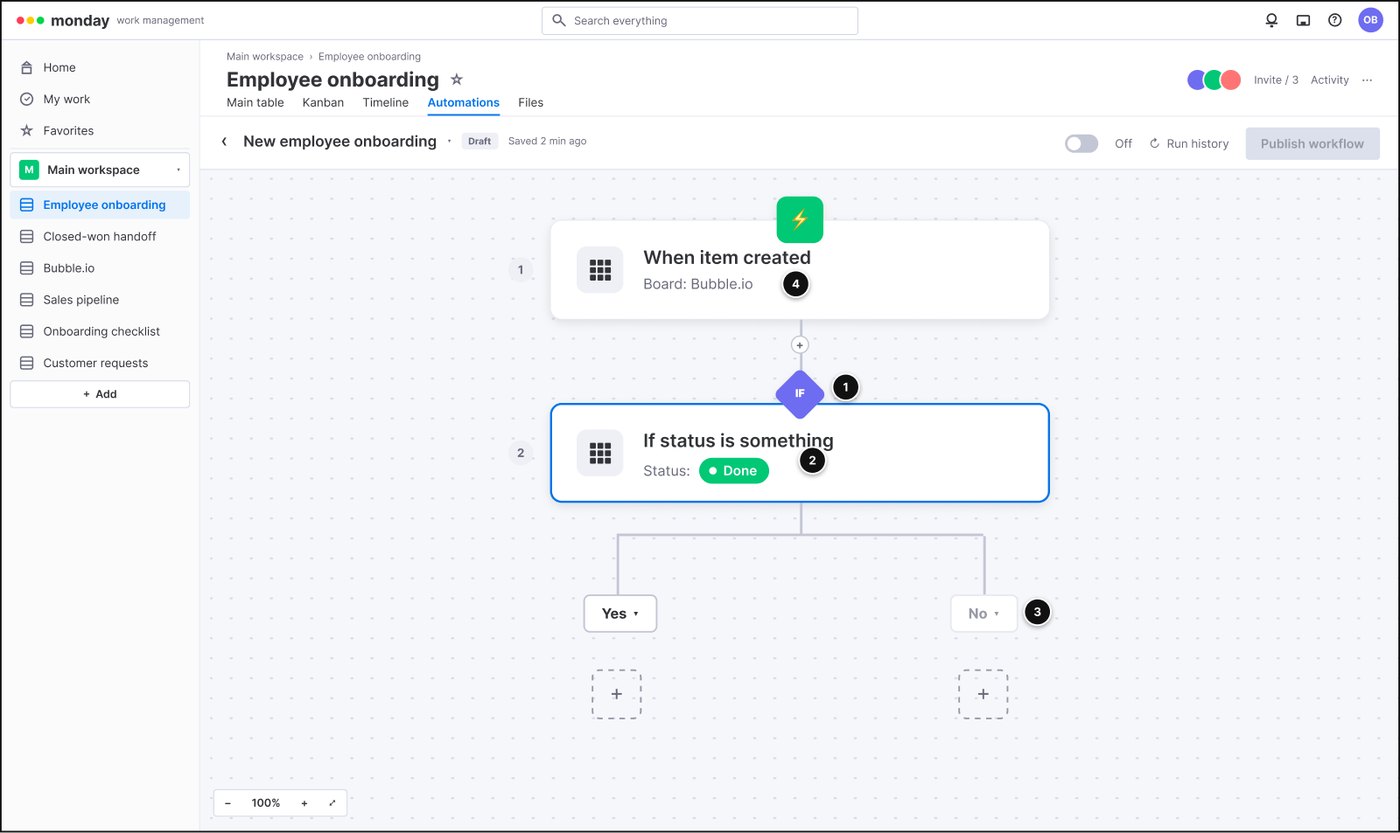
A condition and its two branches
1The "if" diamond sits on the line between steps, so the flow stays one spine.
2The condition reads as a sentence: status is Done.
3Yes and No each get their own slot, empty until you need them.
4The trigger keeps its board context in view.
4 of 8
An app step in the same slots
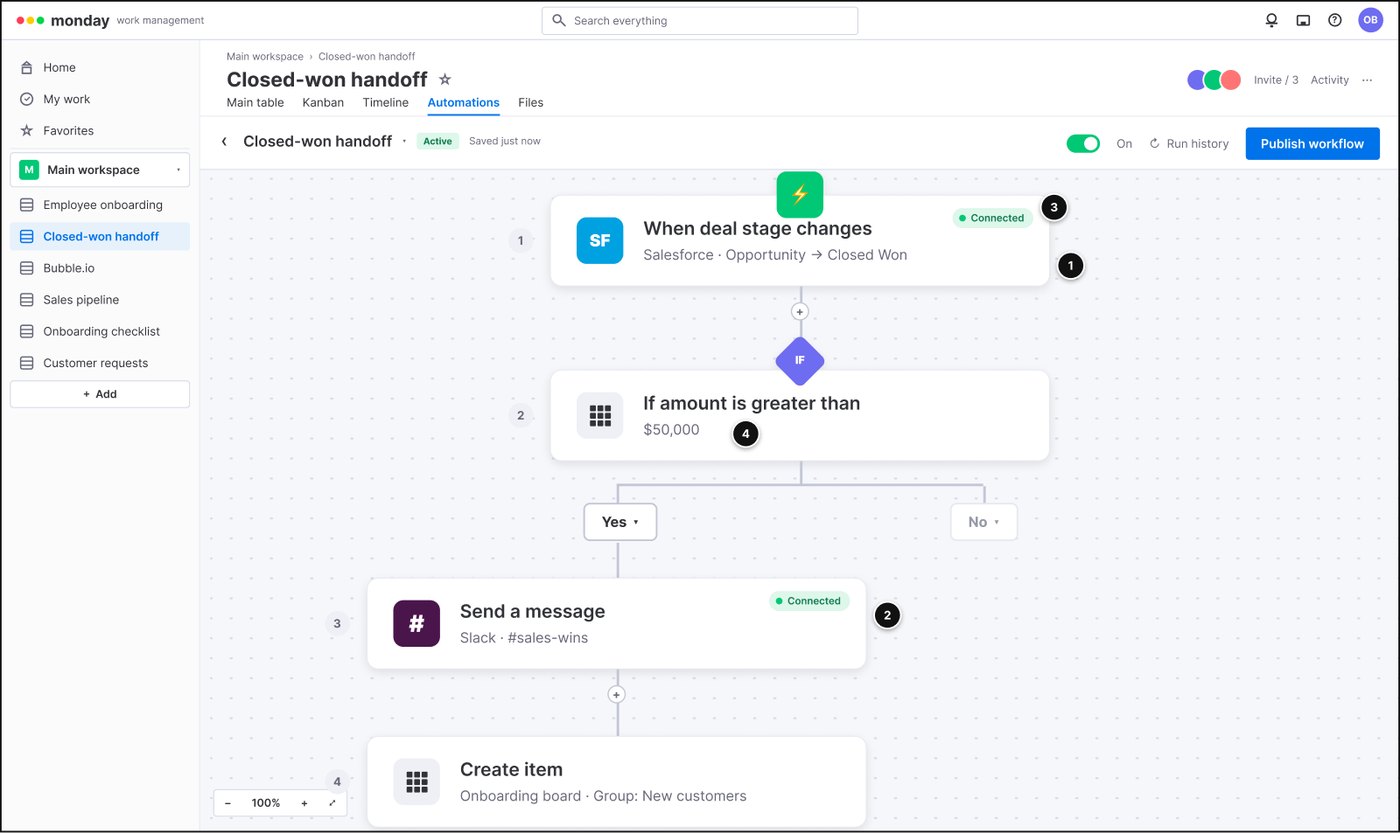
1A Salesforce trigger in the trigger slot: same card, same words as a board rule.
2A Slack action in an action slot.
3Connection state shows on the step that will break, not on a settings page three clicks away.
4The condition is the same block whichever side the data came from.
5 of 8
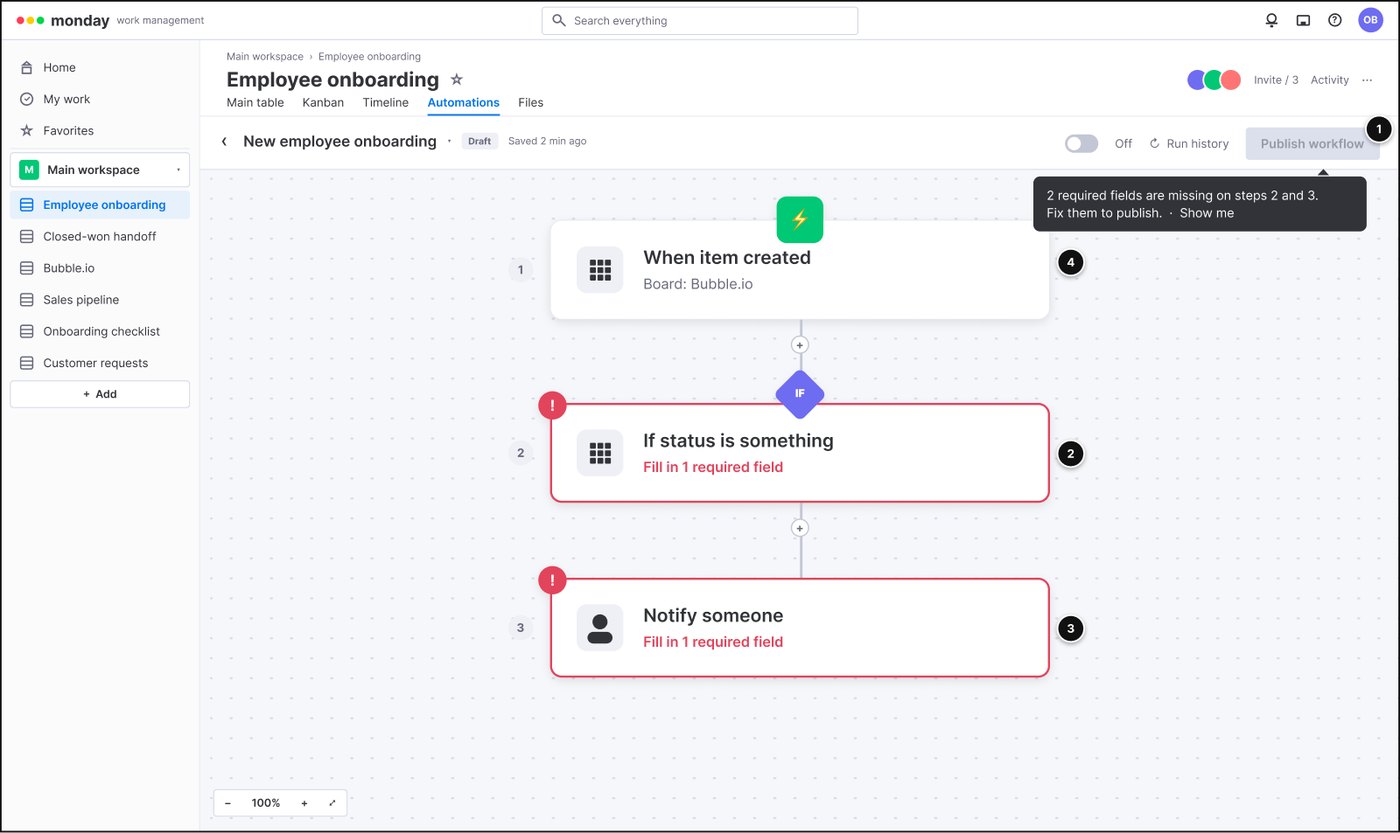
Publish tells you exactly what to fix
1Publish explains the block: "2 required fields are missing on steps 2 and 3", with a "Show me" link.
2The steps with problems are outlined and named.
3Each one repeats what it needs, on the card itself.
4Complete steps look calm. Nothing else changes.
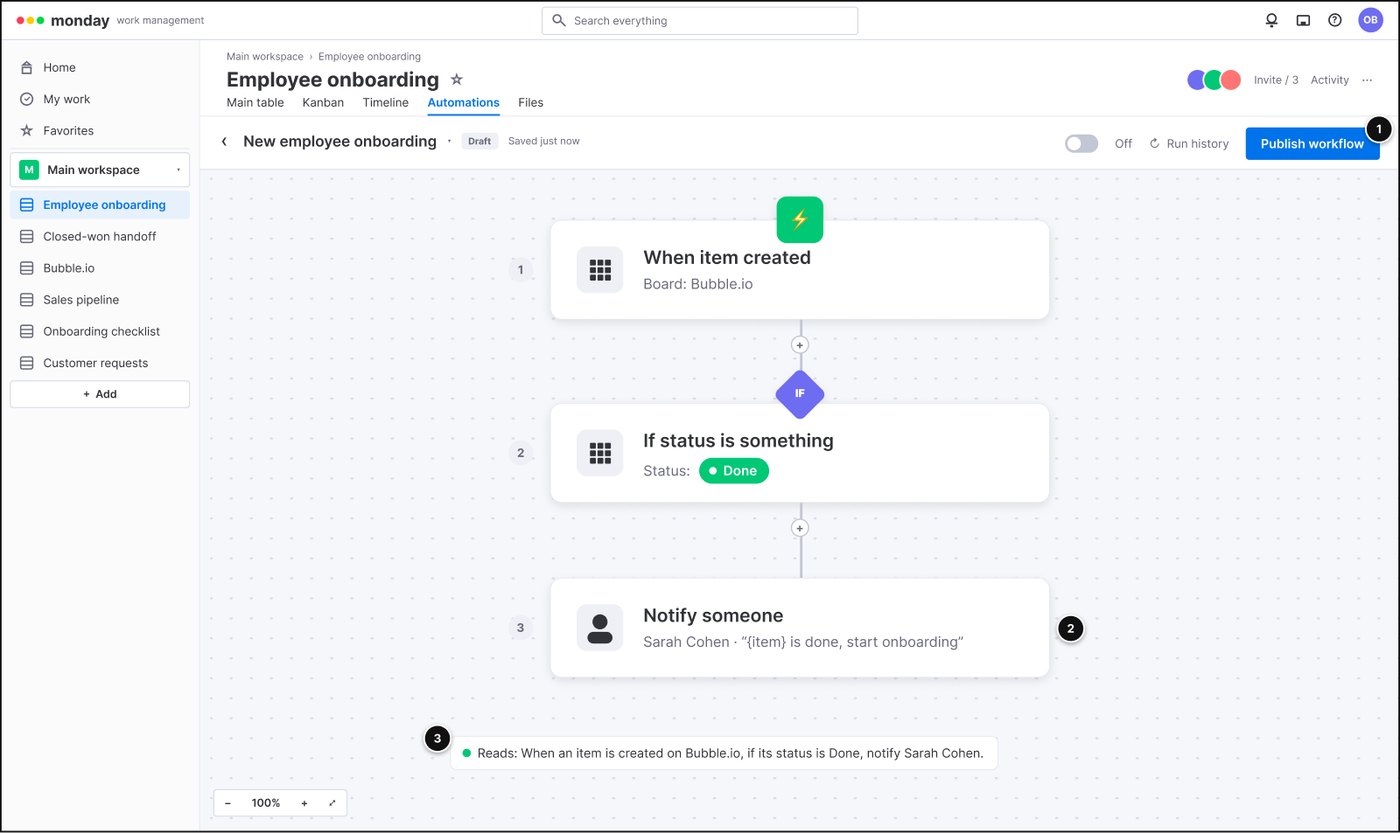
6 of 8
The whole workflow reads back as one sentence
1Every step is filled and Publish is live.
2Actions show their real values: who gets notified, with what message.
3A plain-language readout at the bottom: "When an item is created on Bubble.io, if its status is Done, notify Sarah Cohen." If it reads wrong, it is wrong.
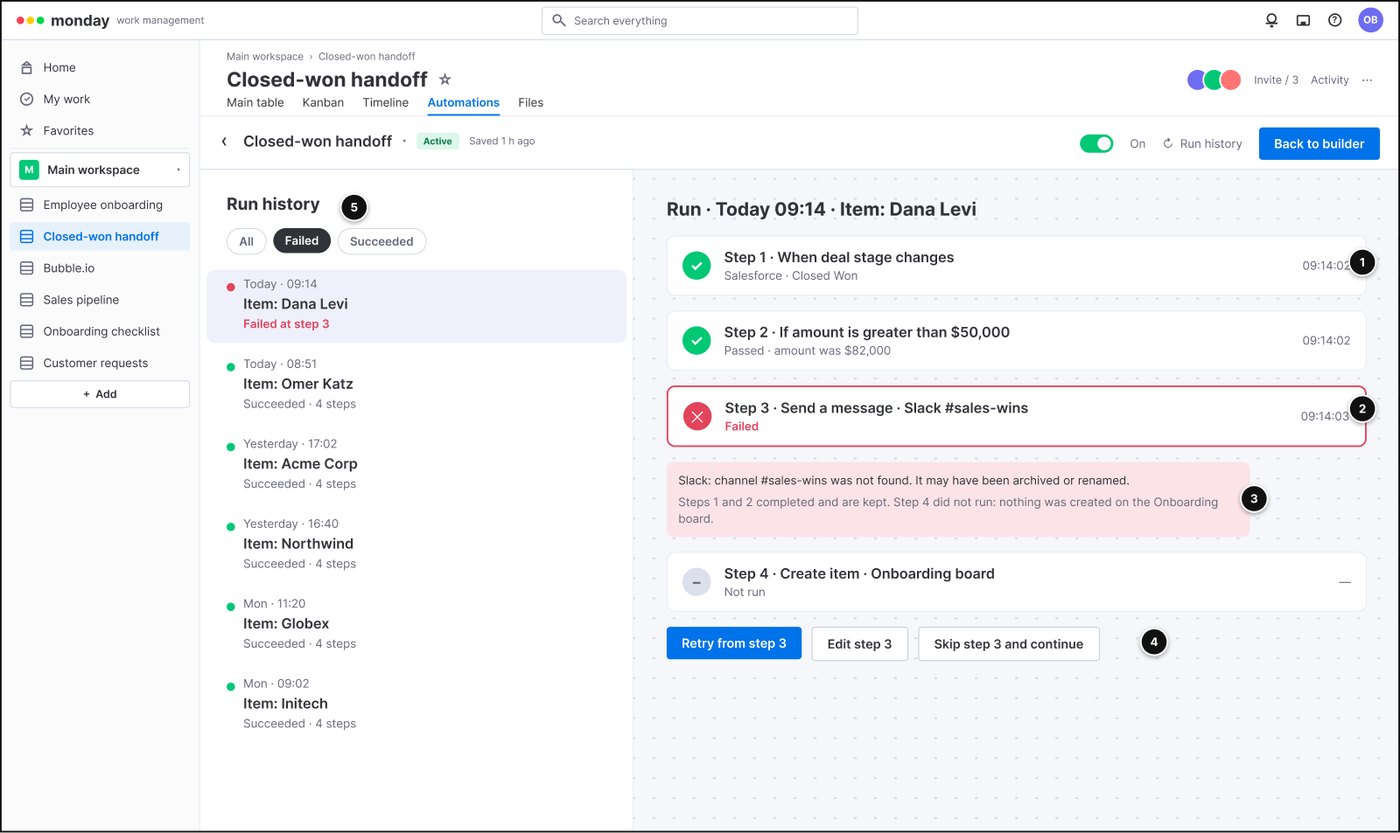
7 of 8
One run history, per-step state
1Each step has its own state and timestamp.
2The failed step is named.
3The explanation says what ran and what did not.
4Retry from the failed step, not from the top.
5One list for every run, whichever app was involved.
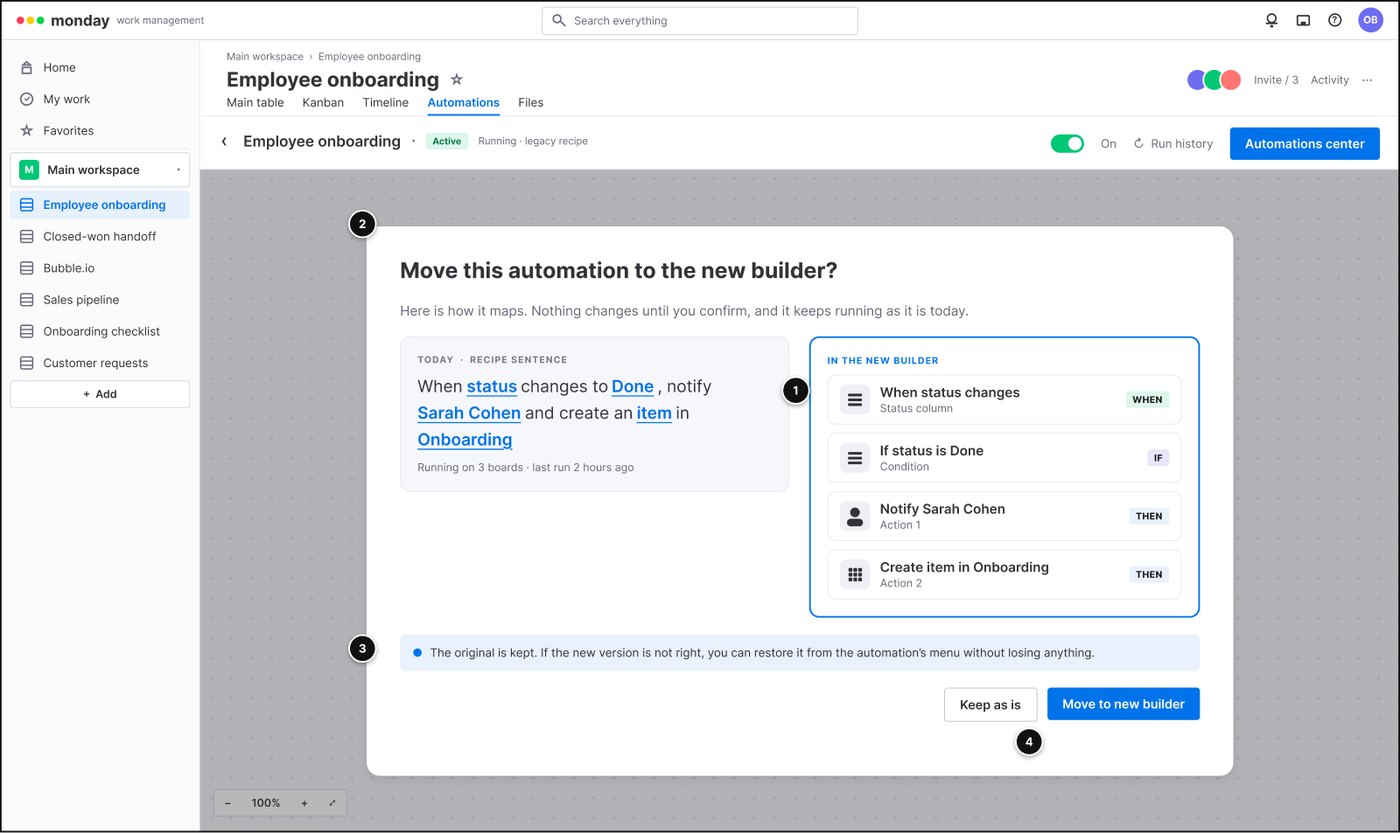
8 of 8
Migration you choose, and can undo
1The old recipe sentence and the new blocks side by side.
2Nothing changes until you confirm; it keeps running as it is today.
3The original is kept and can be restored.
4Keeping it is a first-class choice, not a cancel.
The bet
Don't rebuild it. Earn the right to change only what has to change.
Every attempt before mine had tried to replace the system. I bet the opposite way: let the existing patterns carry most of the load, and spend design capital only where the system had to change. Three decisions followed. Two of them were decisions not to build something.
1
One logic grammar, not two reconciled products
Both builders collapse into a single sentence the whole system can express: when a trigger fires, if a condition passes, then actions run. A trigger or an action can be internal or external without the user needing to know which.
What it cost: a year of arguing about vocabulary before anyone drew a screen.
2
Not the default. Opt-in, with a designed migration
The product instinct was to make the unified builder the new default for everyone. I argued against it and won. People running business-critical automations would have met an unfamiliar editor cold, so nothing changed until they chose it, and the original was kept.
What it cost: two editors live at once, for two quarters, with a designed path between them.
3
Templates: not in the launch, not cut either
A unified builder is only usable on day one if people have somewhere to start. A senior stakeholder wanted the templates marketplace cut to de-risk the launch. I named the trade-off and won it as a committed fast follow, one quarter later.
What it cost: a smaller launch, and a public promise I then had to keep.
The grammar
Three words the whole system can speak.
when
a trigger. Something happens.
if
a condition. A check passes. Optional, can branch.
then
actions. One or more steps run, in order.
Internal events, the old Automations. Anything that happens on a board: a status changes, an item is created, a date arrives, a column is updated.
External events, the old Integrations. Anything that happens in a connected app: a Slack message, a Salesforce deal stage, a Gmail message, a HubSpot contact, hundreds more.
Both feed the same slots. The app is a property of a block, not a place you go. Integrations stopped being a separate product and became a kind of trigger and a kind of action inside one grammar.
Run, migrate, reuse
One card, three states, every app.
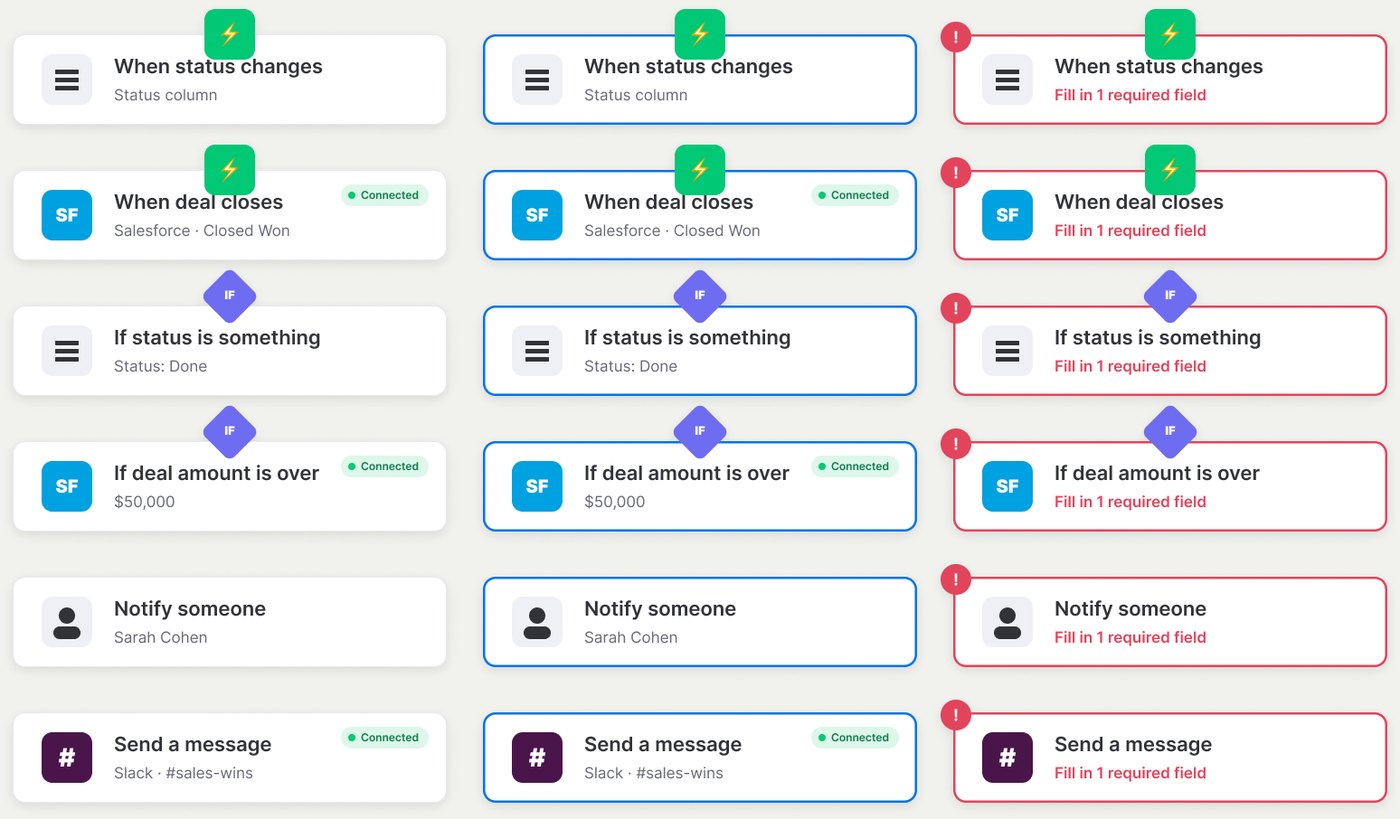
Internal or external, the block is the same component. Default, selected and "fill in a required field" look identical for a status change and for a Salesforce deal. The app mark and the connection pill are the only variation, which is the whole unification on one screen.
The component set. Three states across board and app steps. Nothing about Slack lives in "another product".More detail: what the migration had to protect
Customers had thousands of automations running business-critical work. The migration dialog shows the old recipe sentence and the new blocks side by side, promises nothing changes until you confirm, and keeps the original so it can be restored. Keeping it is a first-class button, not a cancel link.
The run history does the same job after the fact: one list for every run, per-step state, the failed step named, and retry from where it broke rather than from the top. Support stopped reconstructing runs from two logs.
Outcome
Shipped in Q3, templates in Q4, nothing broken in between.
The unified builder shipped with migration as an opt-in, and the templates marketplace followed in Q4 as promised. No live workflow broke during the rollout. Adoption came from people moving their own workflows across, not from a forced default, which is the only kind of adoption that tells you the model is right.
Two builders became one
Board rules and app connections in a single editor, one vocabulary, one run history.
Zero broken automations
Because nothing moved until its owner moved it, and the original stayed restorable.
Templates one quarter later
The fast follow shipped when I said it would, which is what made the smaller launch acceptable.
ZoomInfo Lite · Onboarding and activation · 2025 · Senior product design team lead
We asked new users what they came to do. The order of the options was answering for them.
ZoomInfo Lite is the self-serve front door to the business. Signup was healthy and most new users never did the one valuable thing. This is how the team found the real first job and built a front door for it.
67→51%
chose "search" once the option order was randomized. Our default order had inflated it.
6→20%
chose "upload a list" once the order was randomized. Real demand we had buried.
46→63%
of new users then reached a first real search, after the rebuild.
The situationThe org treated it as a conversion problem and reached for pricing. The data said the drop was right after the door: signup fine, first-week usage flat. I reframed the team around activation before the sale.
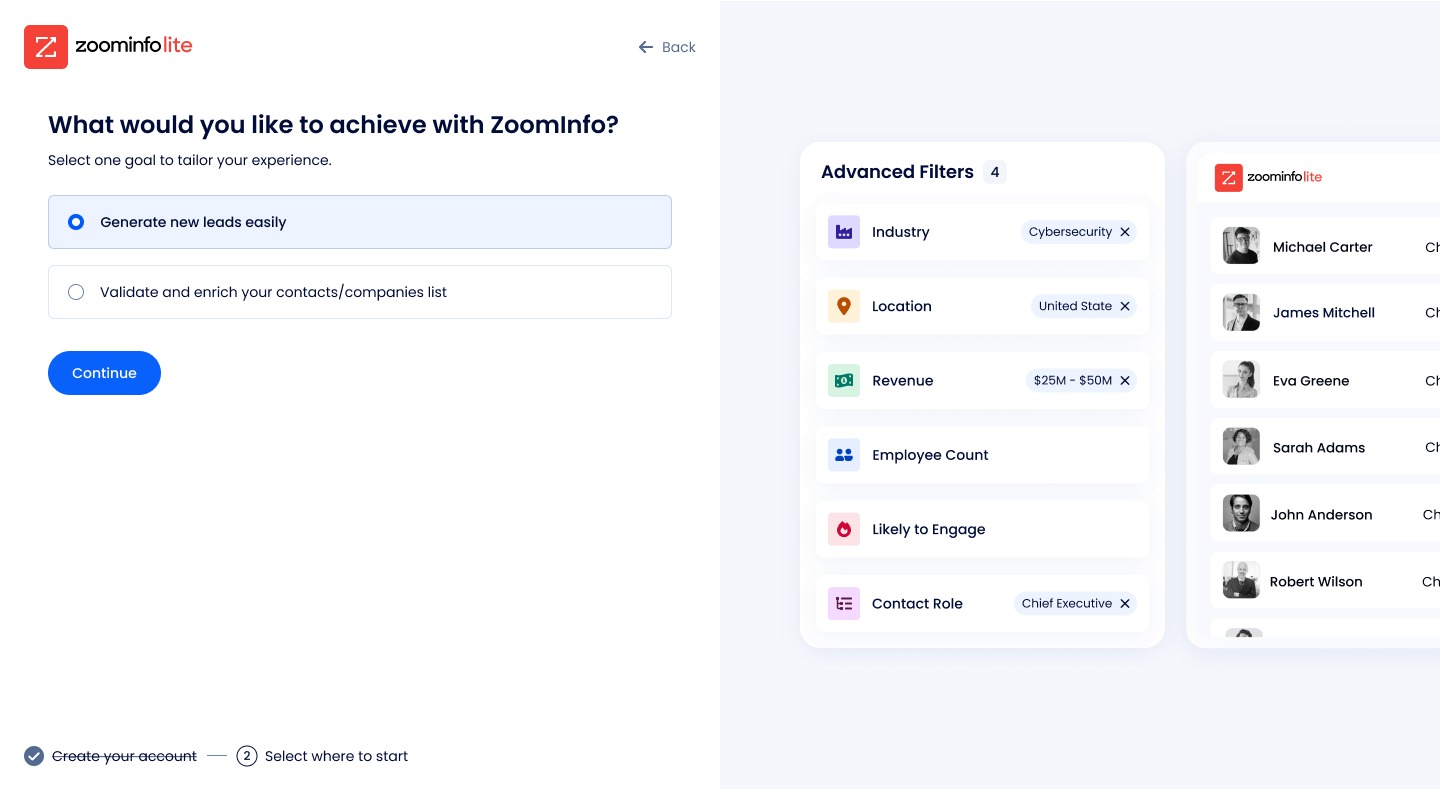
What I didChanged how the team decides (hypothesis, metric, smallest version behind a flag, read it in Amplitude), randomized the goal options to find real demand, cut the goal screen to the paths that activate, built upload-a-list as a first-class flow, and surfaced a filter the product already knew led to value.
What happenedUpload went from 6% to 20% of stated intent. New users reaching a first real search went from 46% to 63%. Login to search up 32%.
Where it sits
Activation, defined: a new user runs a real Advanced Search and reveals usable contact data.
ZoomInfo Lite is the self-serve product and the highest-conversion surface in the company. I lead a team of eight across onboarding, pricing and the early experience. Design owns one number here: whether a free user becomes a paying one. You cannot convert a user who never got to first value, so the work starts there.
More detail: the operating model and the team
The most important thing I did was not a design. We went from shipping on opinion to experimentation-led: every bet is a written hypothesis with a metric, we ship the smallest version behind a flag, we read it in Amplitude, and we review on outcomes.
Designers own a journey end to end, not a slice of one product, and each owner owns a number: onboarding on activation, the activation designer on depth (login to Advanced Search), the upgrade path on free-to-paid. When a designer went on leave I reshuffled ownership so no journey went dark, and handed onboarding to a craft-strong, funnel-newer designer as a deliberate stretch with close coaching.
Before
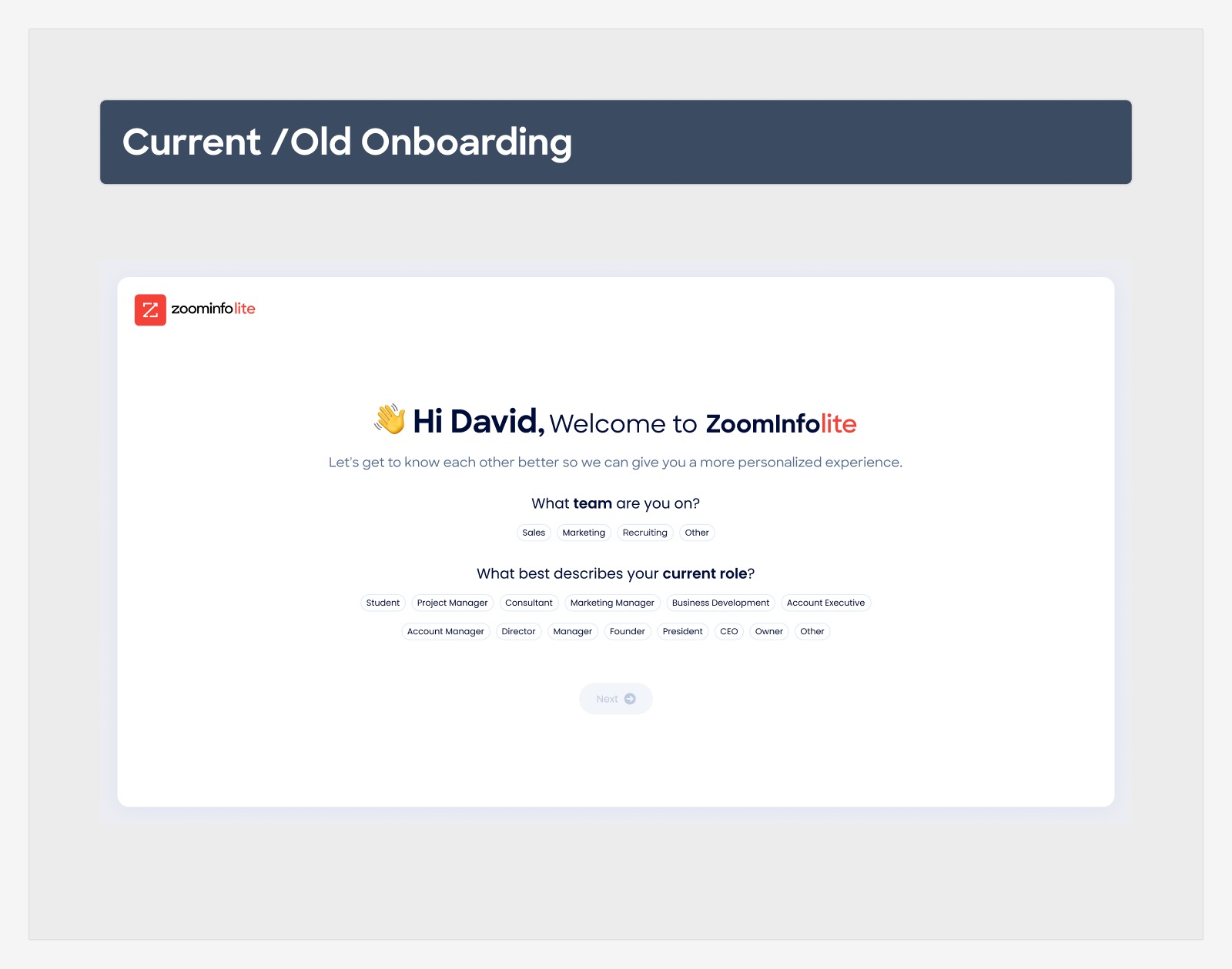
The old onboarding asked who you were. It never asked what you came to do.
Team, role, a wall of chips, then straight into the product. The guidance that followed was built on our assumption about the goal. So instead of redesigning on that assumption, the team tested it.
The old onboarding. Team and role, dozens of chips, no question about the goal.The first goals screen. Five options in an order we chose. That order turned out to be the problem.
The measurement
Randomize the order, and a job we had buried shows up.
Both columns are analytics, not guesses. With our default order, 67% chose specific search, which seemed to confirm our instinct. That number was our own UI talking. With the order randomized, search dropped to 51% and "upload a list" jumped from 6% to 20%. Same analytics; once we removed our bias, a top job we had buried appeared. We had been optimizing the wrong front door.
Specific contact or company search
67%default order
51%randomized
Upload a list
6%default order
20%randomized
Lead generation
18%default order
19%randomized
If you had data, how were you wrong? We were not wrong about the measurement, we were wrong to trust it. The data faithfully measured a biased screen. Randomizing the order is what made the measurement honest.
Three calls
Fewer doors, one real flow for the job that mattered, and a smaller upload we accepted on purpose.
1
Fewer choices, stricter paths
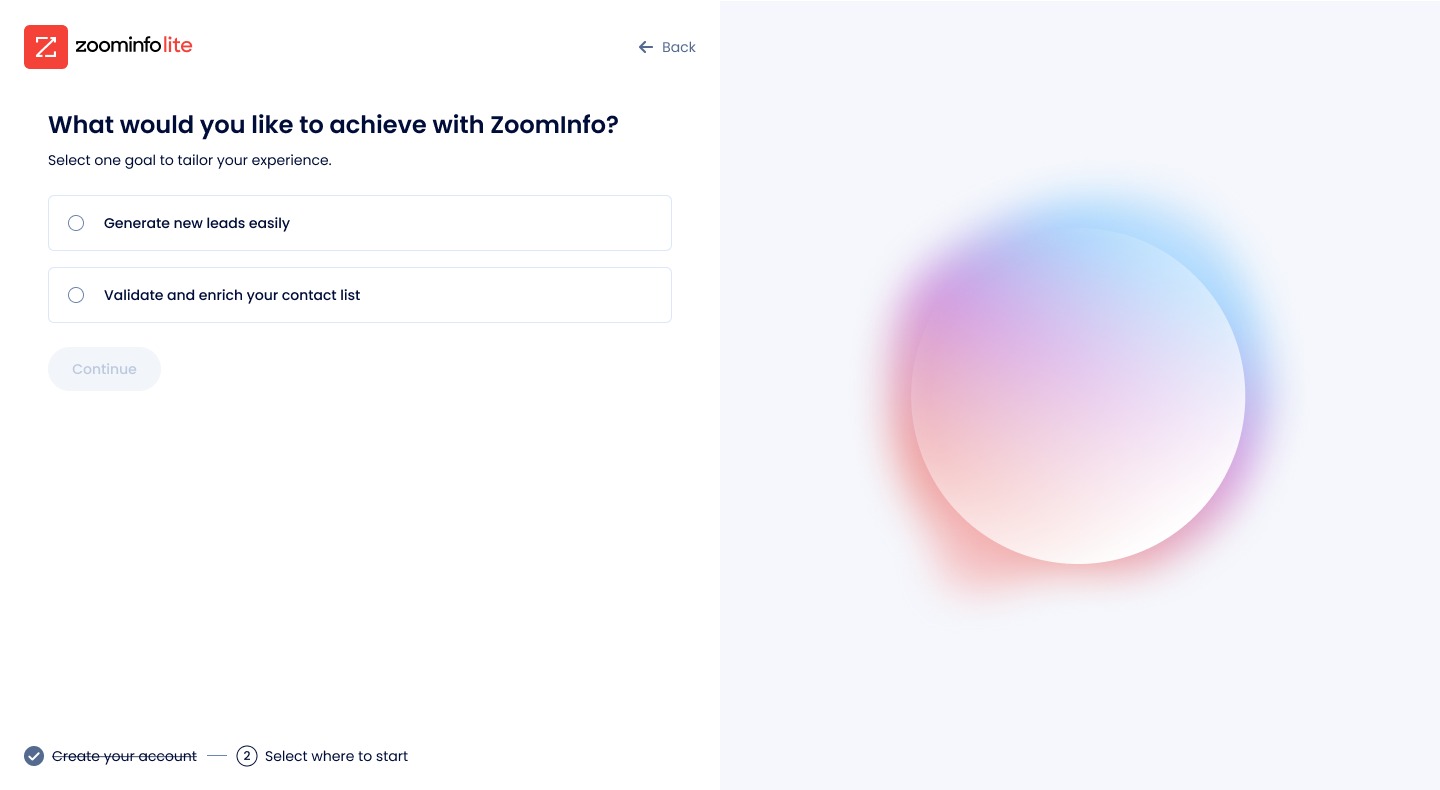
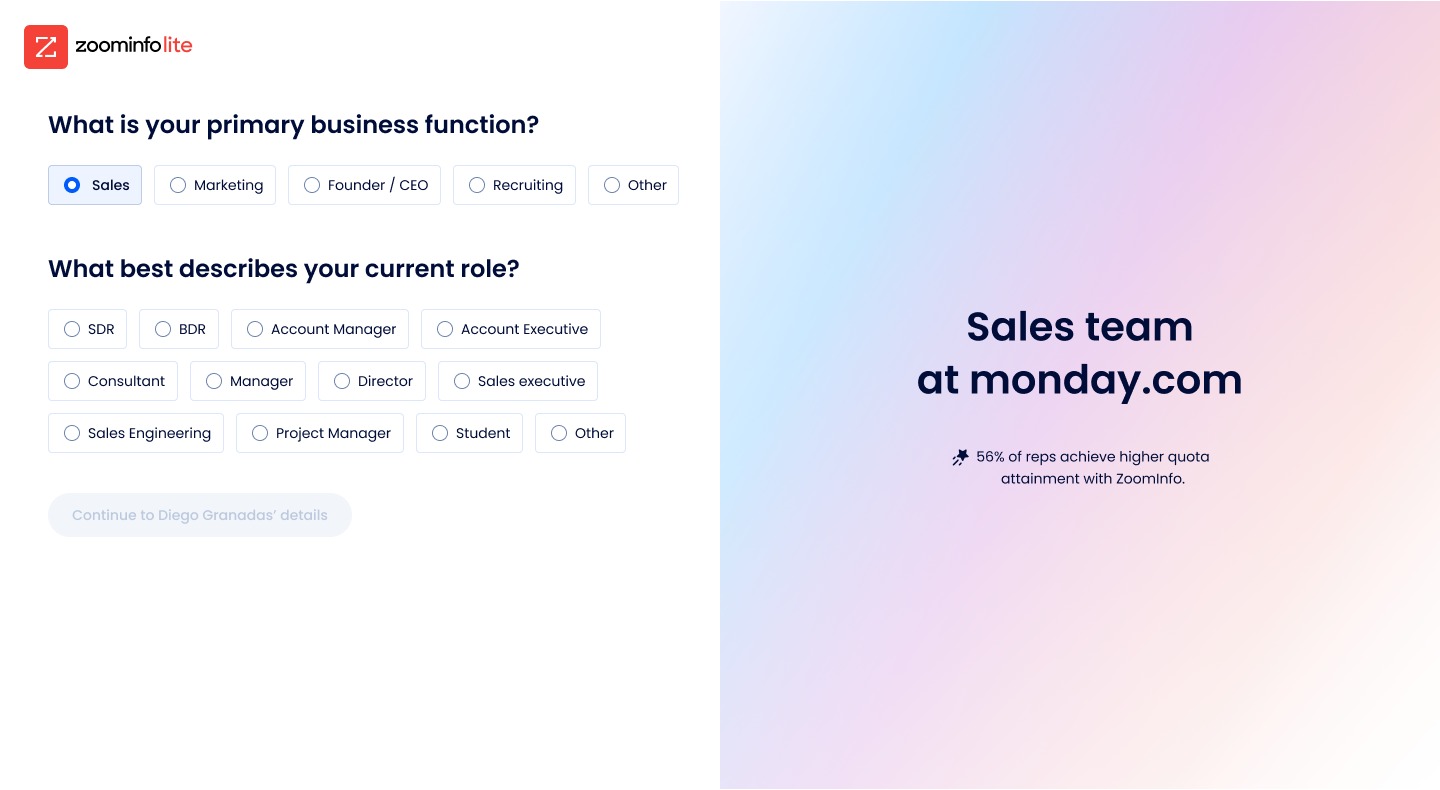
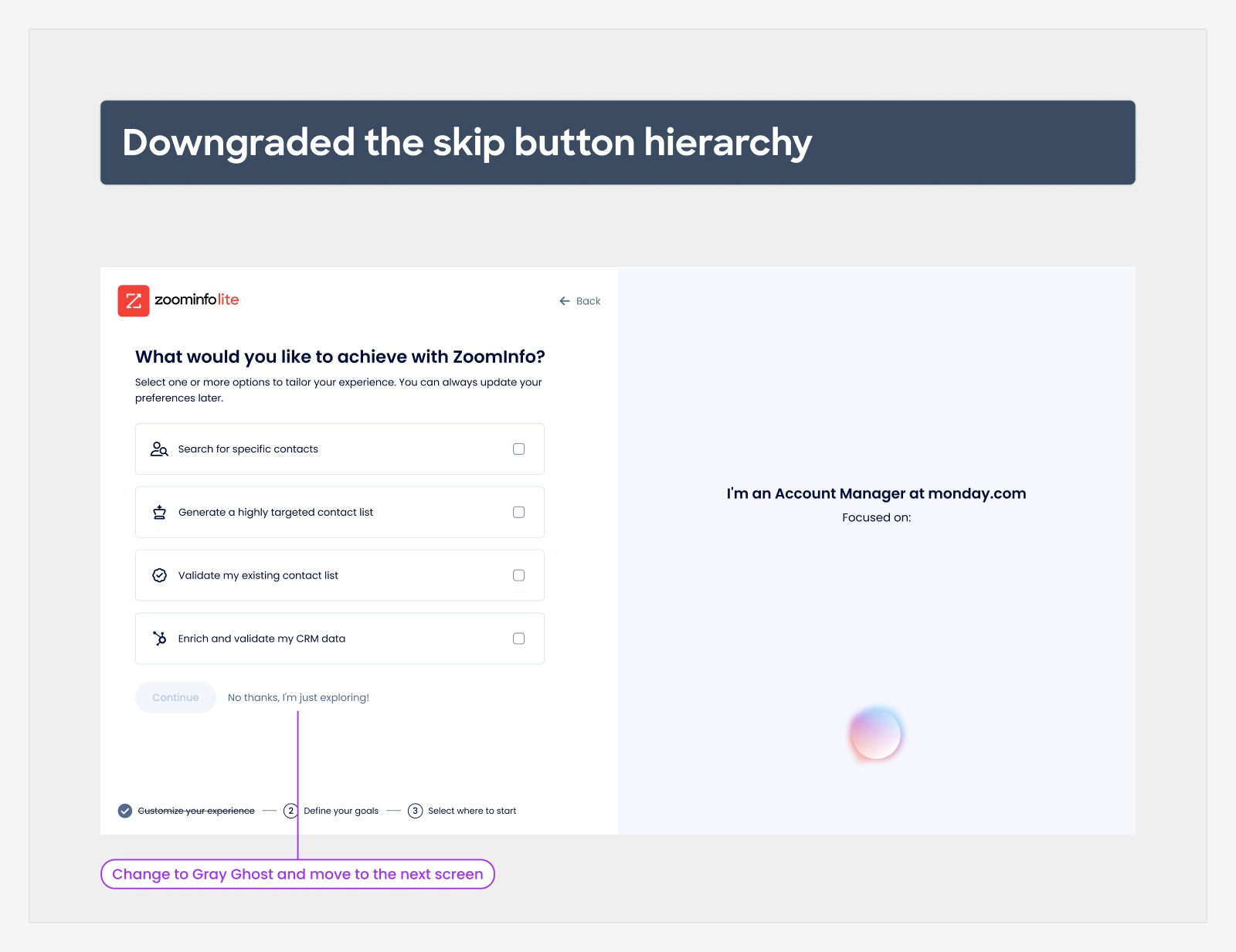
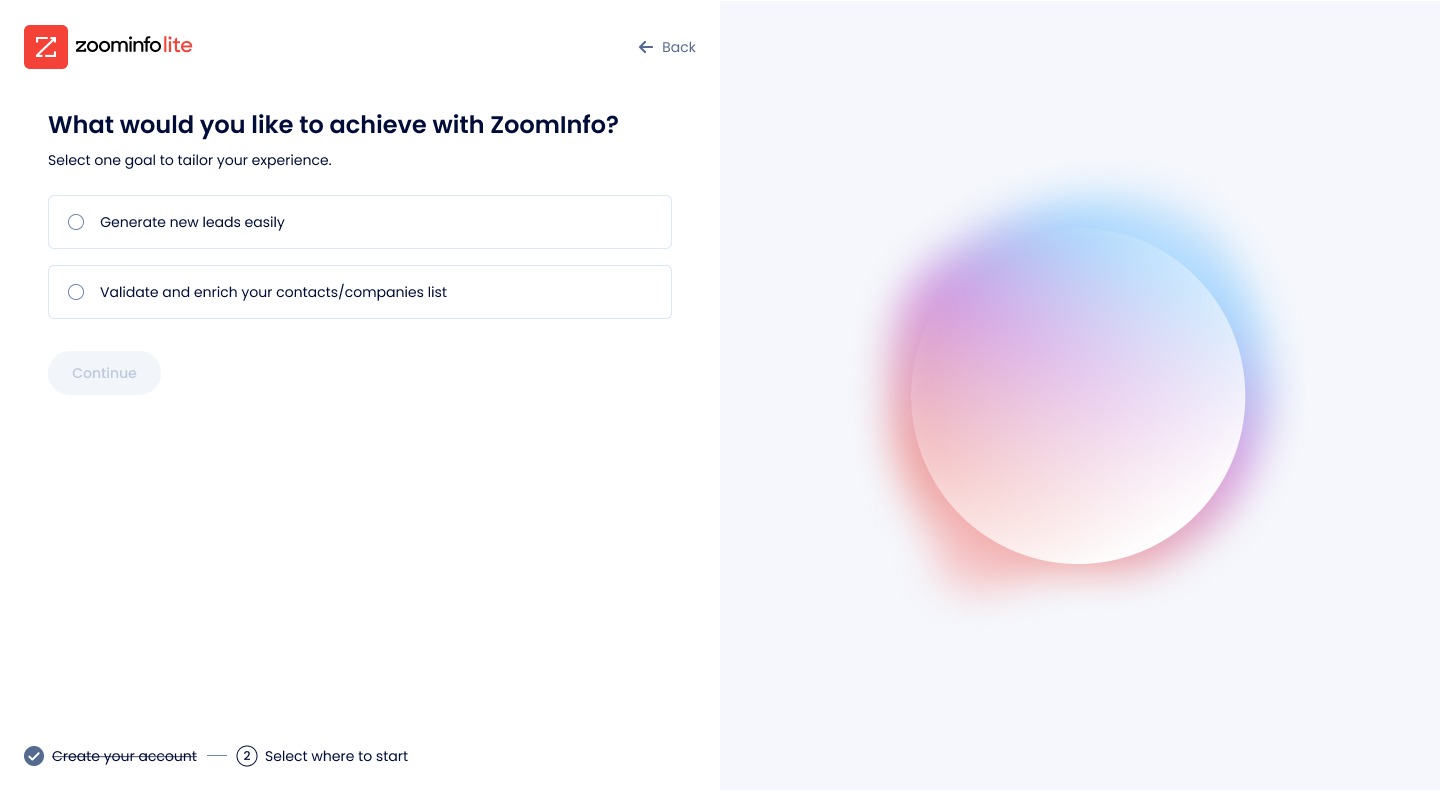
The goal screen went from five options to the two paths that actually lead to activation. "Quick Search" users got lost and missed every downstream nudge, so it stopped being an equal door. The skip button was demoted in the hierarchy. One question per screen instead of a wall, a personalized proof point so the user sees themselves, and a dedicated goals step the old flow never had.
Counter-intuitive in a self-serve product: the drop-off was not from too many steps, it was from too many optional paths.
2
Upload a list, first class
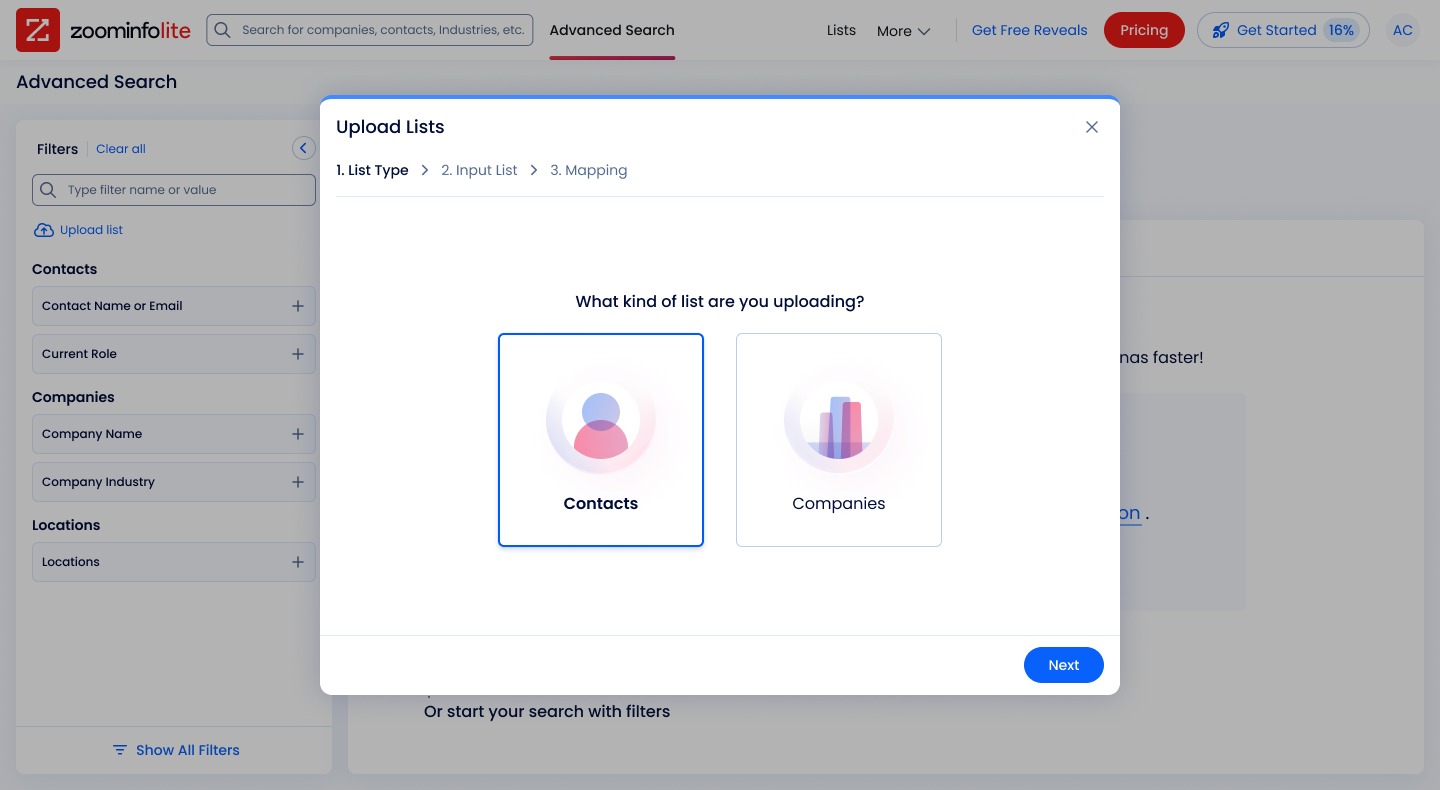
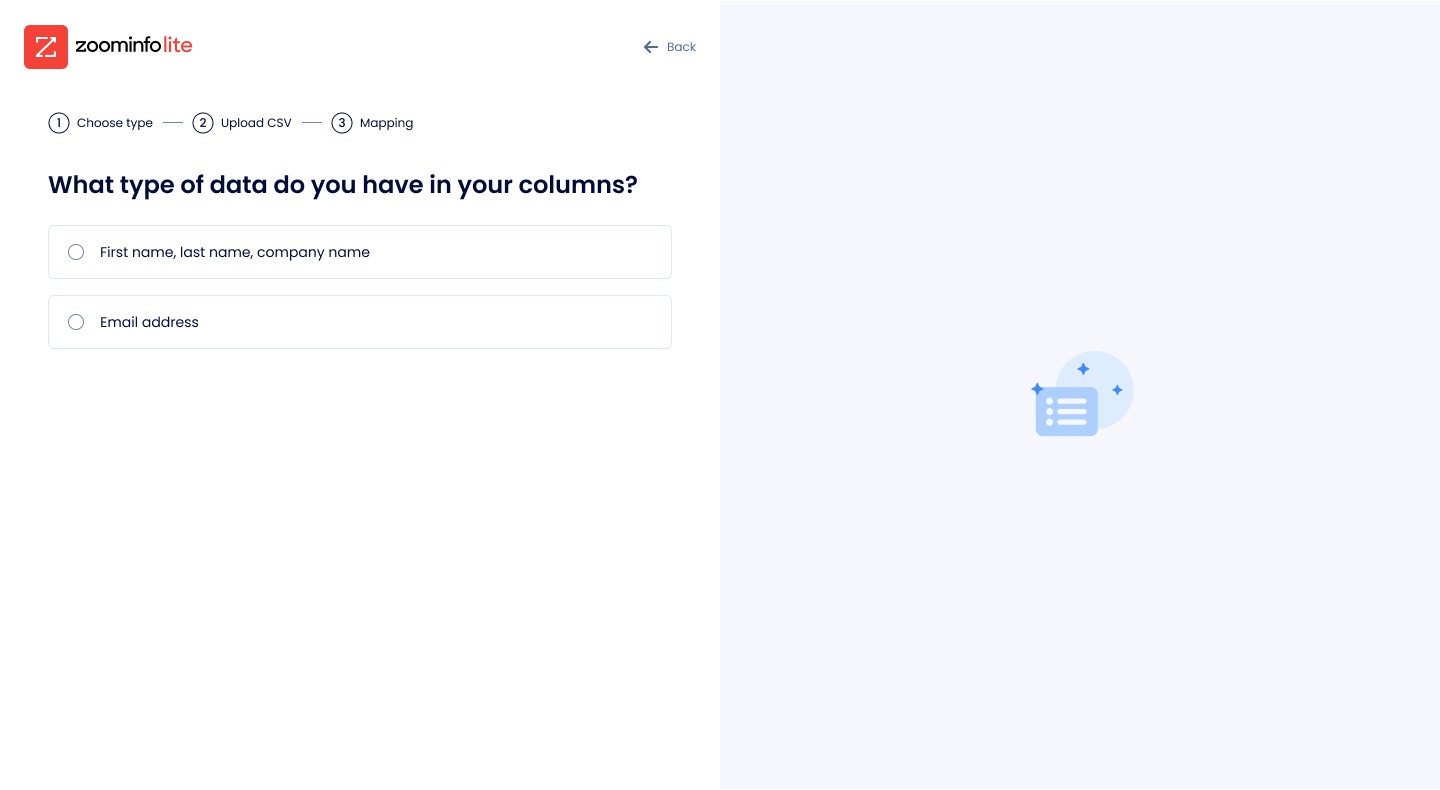
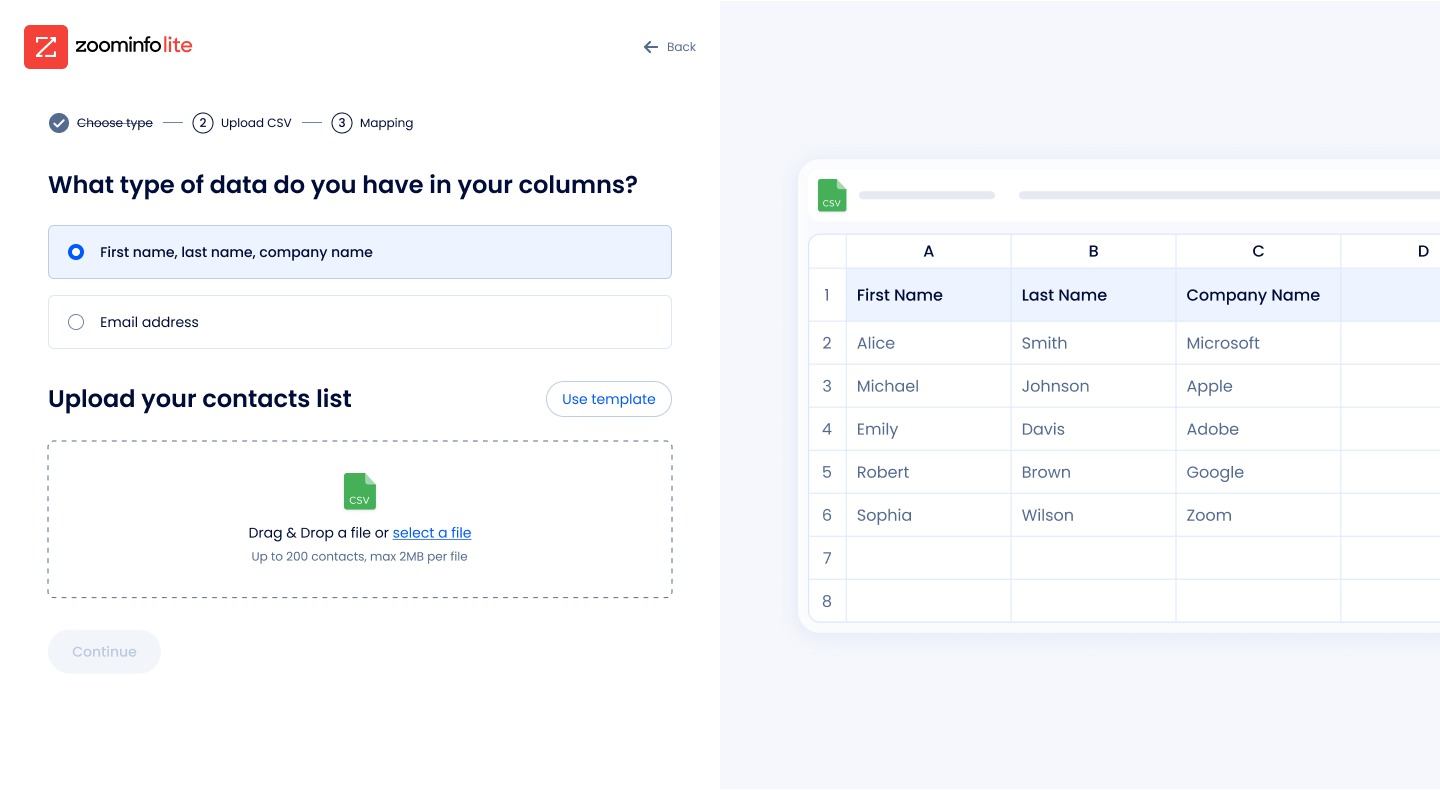
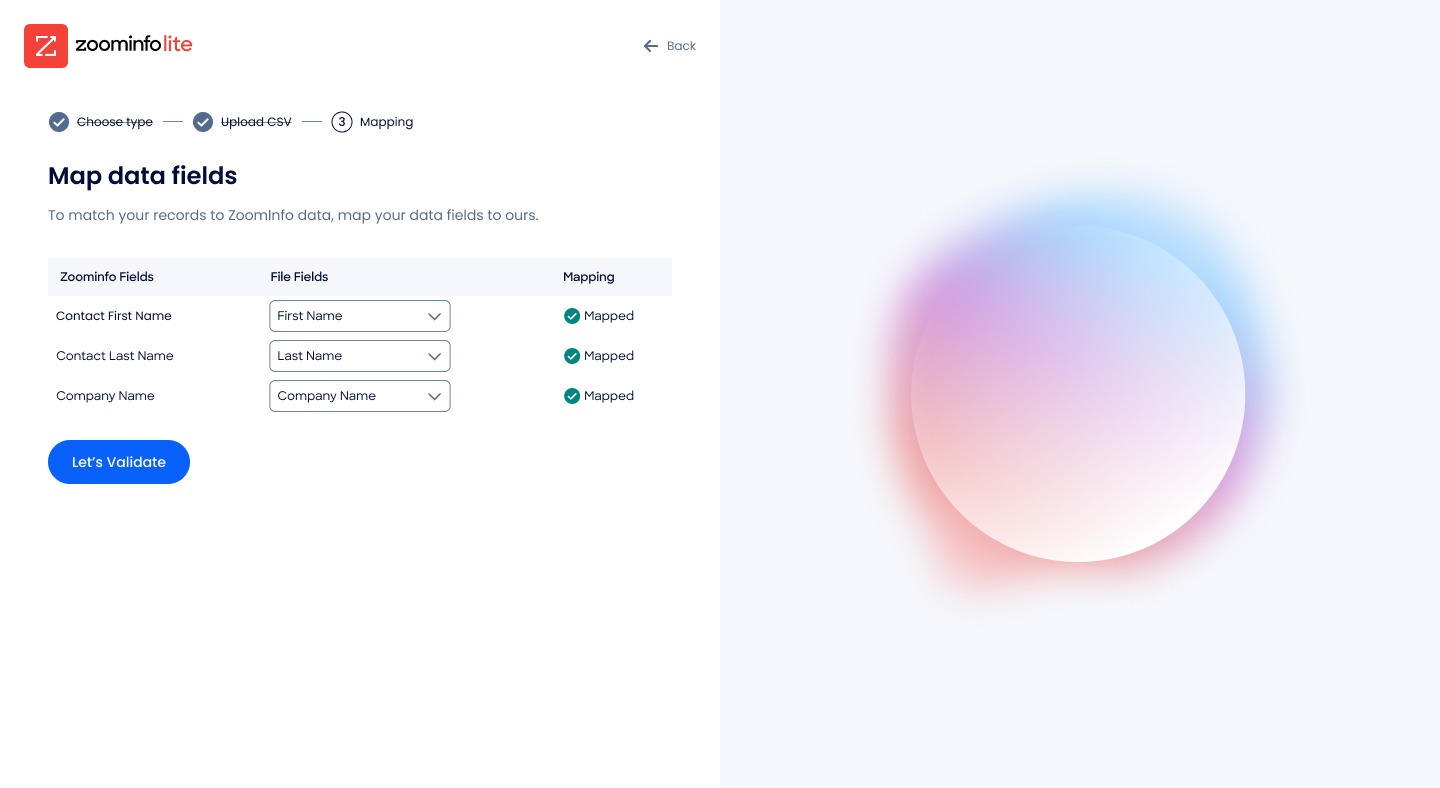
Once the data said upload was 20% of intent, it earned a real flow, not a buried button: an in-product entry point, then a guided three-step flow (list type, CSV, mapping) with validation and enrichment built in. Inside it, a sample-download step I almost cut turned out to be the bridge: half the people who took the template went on to upload.
Trade-off accepted: average upload went from 7 columns to 5. In early self-serve, activation matters more than activation depth.
3
Surface what the product already knew
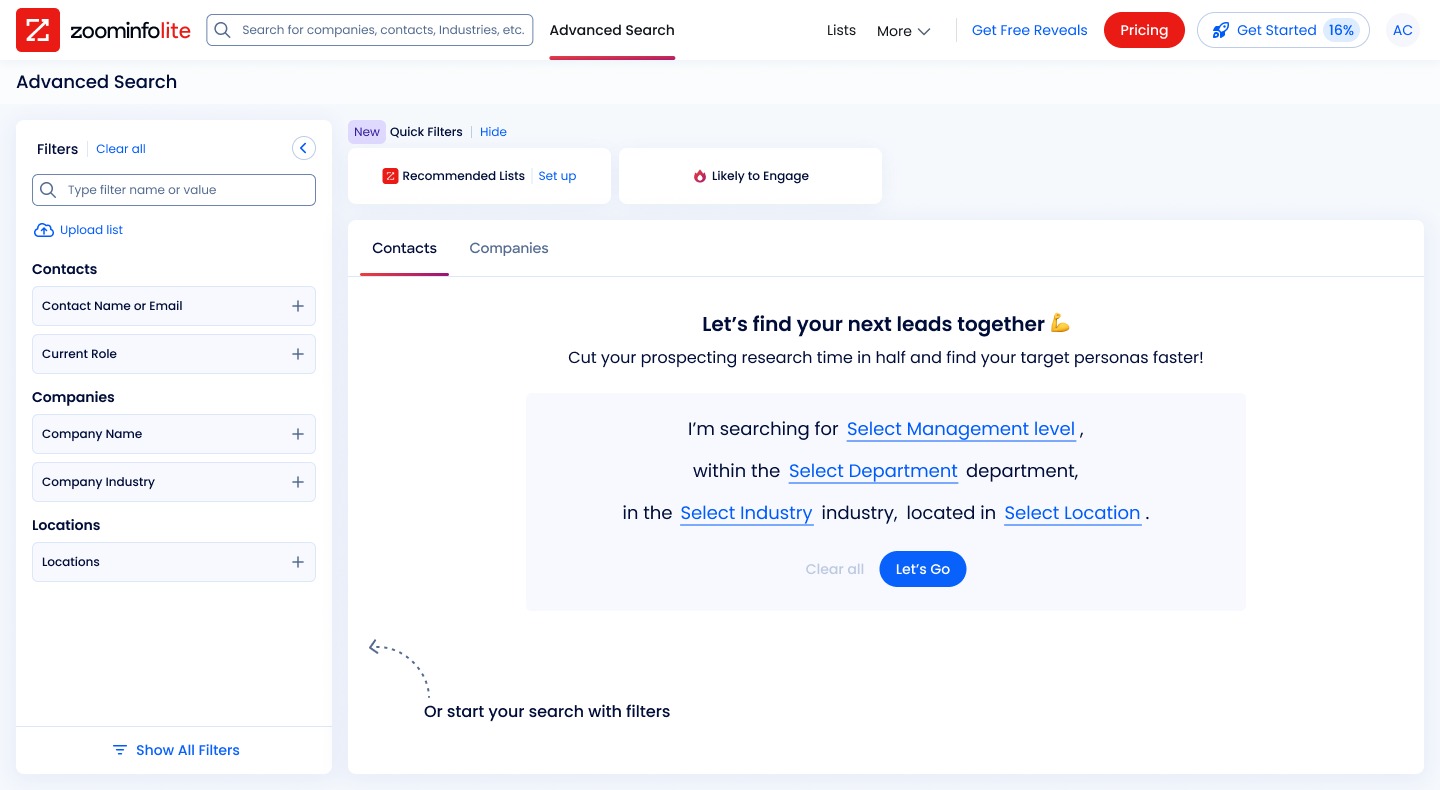
While instrumenting the flow, the team found a signal hiding in plain sight. Users who filtered by "Likely to Engage" bought at 1.5% versus 0.3%, five times more likely, but the filter was buried and used a couple of hundred times a month. We promoted it to a Quick Filter. Same behavior, right UI.
We did not invent a feature. We surfaced the path the product already knew led to value.
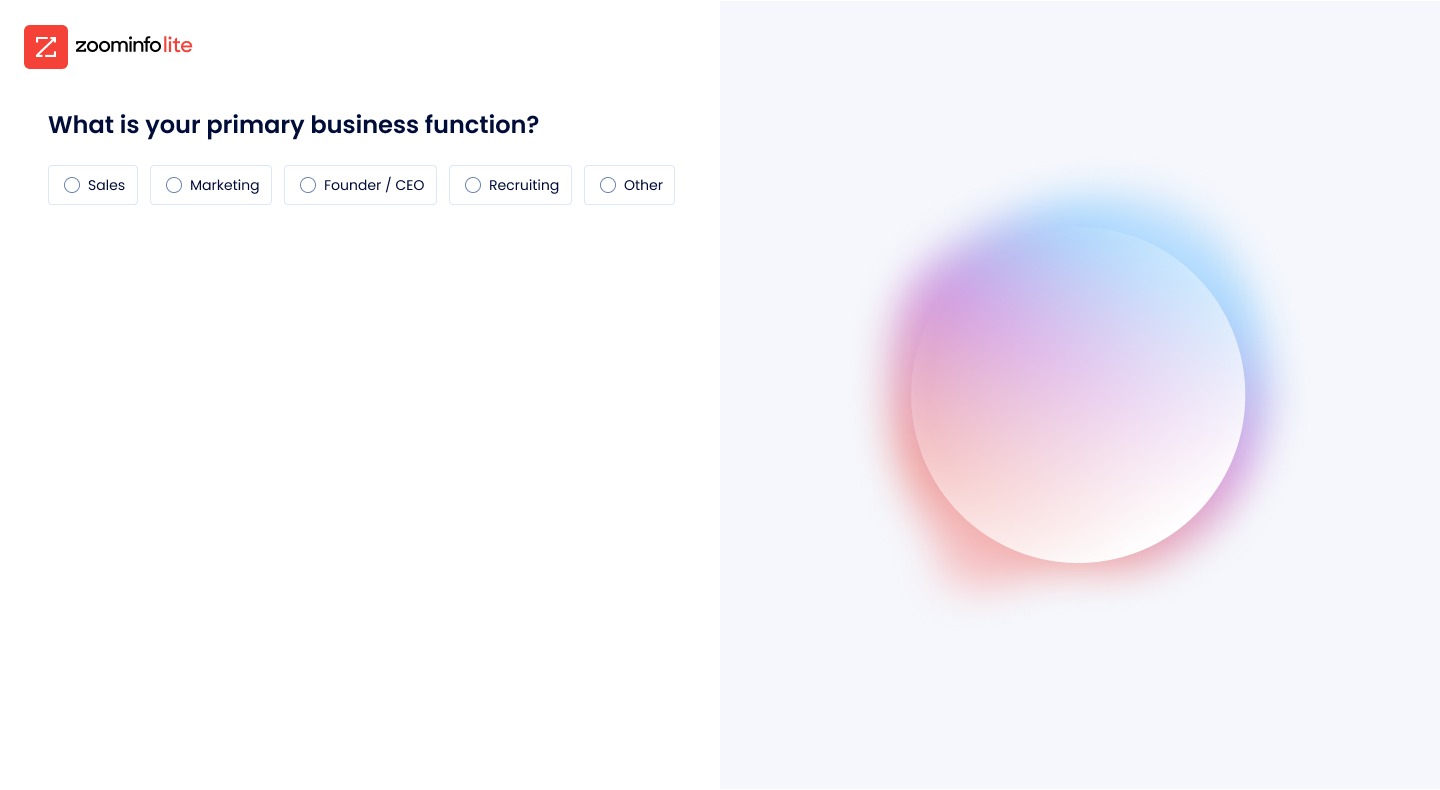
After: two doors. Only the paths that lead to activation. Continue is disabled until you choose.Skip, demoted. "No thanks, I'm just exploring" became a ghost link instead of a peer of Continue.One question per screen. Role and function still get asked, with a proof point that changes as you answer ("Sales team at monday.com").In-product entry. Upload Lists opens from Advanced Search as a guided three-step modal: list type, input list, mapping.
The flow
Eleven screens, longer on purpose. Each one removes a reason to leave.
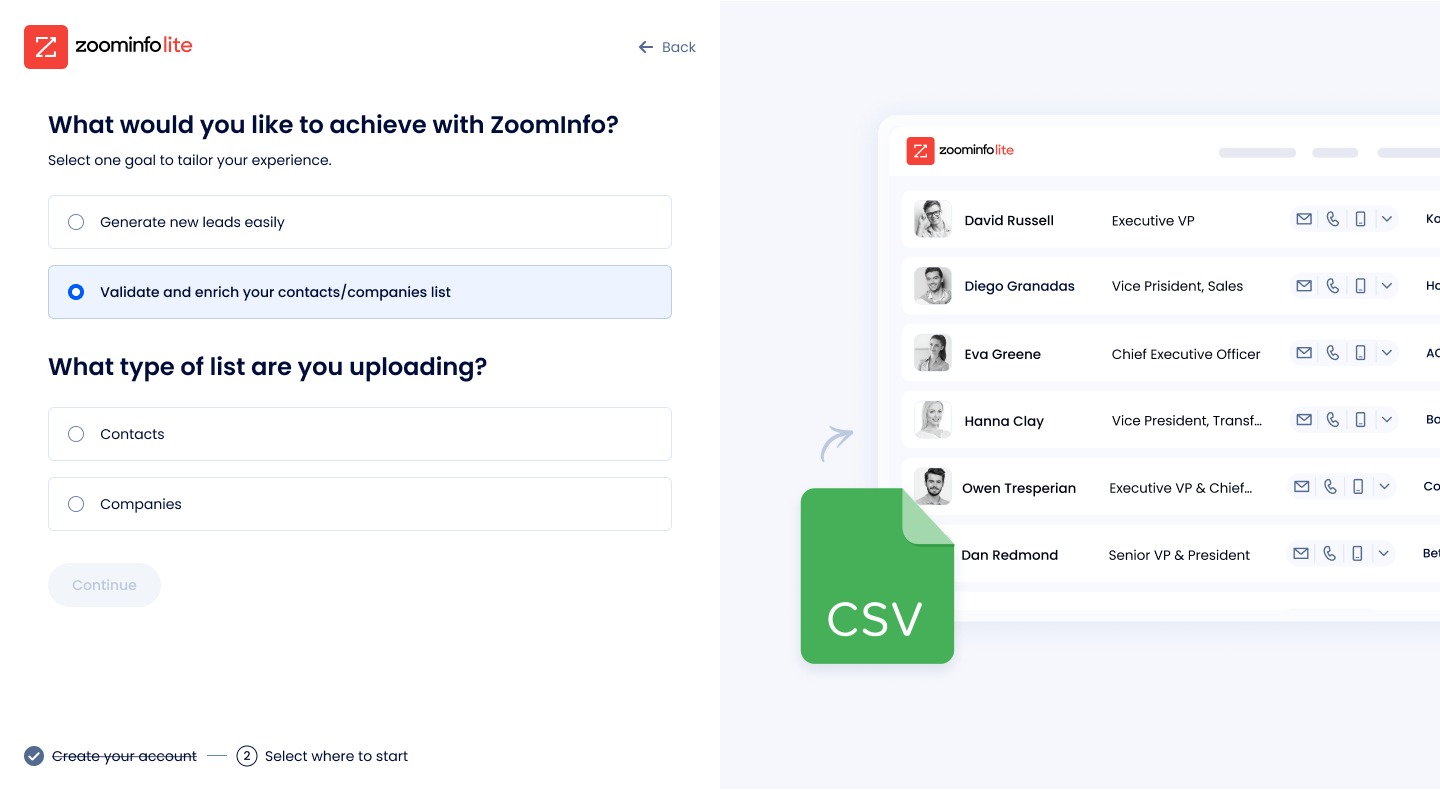
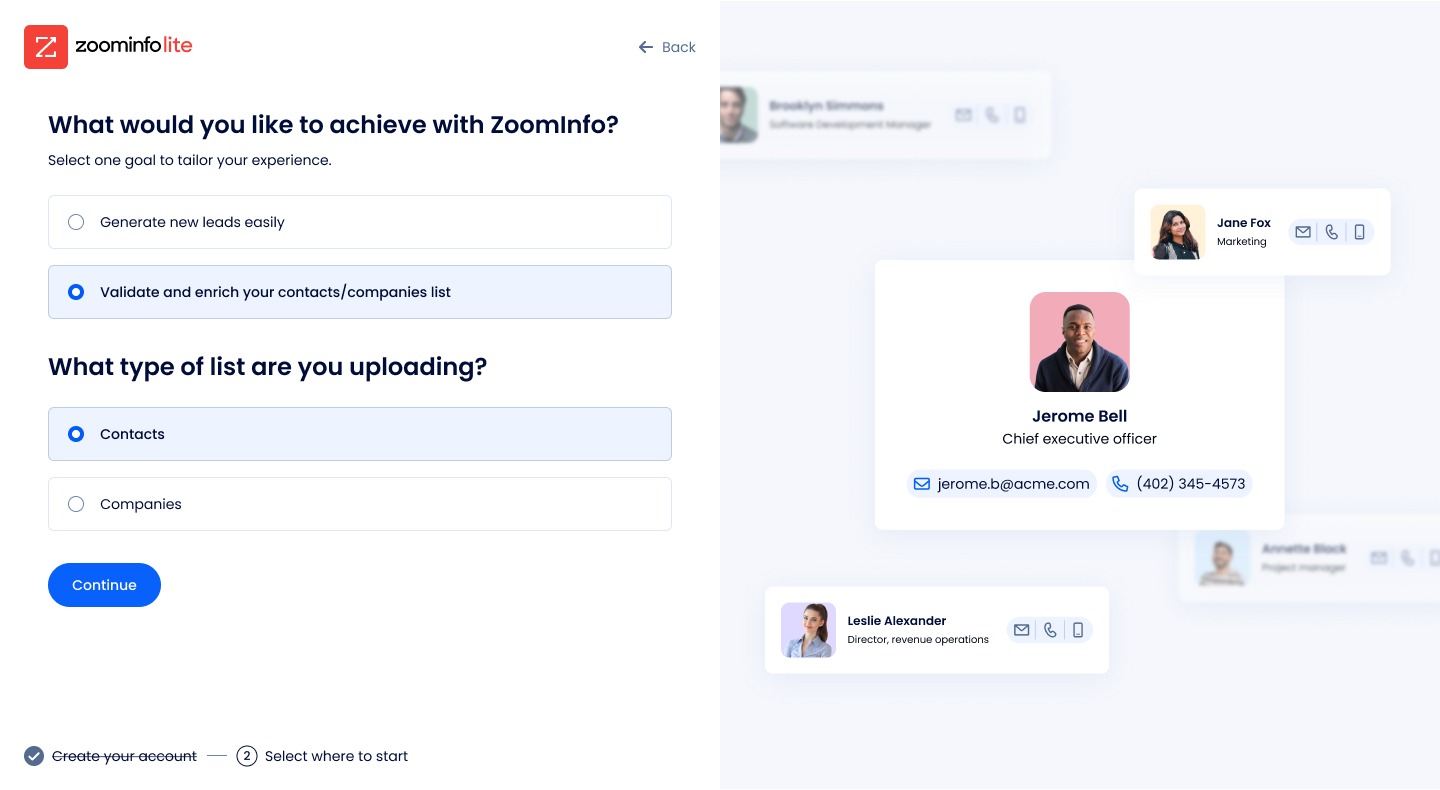
Step through the onboarding the way a new user meets it. One live control at a time, the second question inline instead of on a new page, the columns asked before the file so mapping arrives pre-filled, and a template for anyone who does not have a list ready.
1 of 11
Choose your goal
1One question, one choice. Continue stays disabled until you pick.
2The right panel previews what you get.
2 of 11
The only fork
1"Generate leads" is the one alternate path.
2The preview on the right is the actual product, not an illustration.
3 of 11
Pick the list type
1The second question appears inline, not on a new page.
2The CSV becomes the hero on the right.
4 of 11
Contacts selected
1Show the enrichment, not the upload.
2The preview becomes a filled-in contact card, what you will get back.
5 of 11
What is in your columns?
1Ask about the columns before the file.
2This is what makes mapping automatic three screens later.
6 of 11
The upload appears, with a bridge
1The drop zone only appears once the type is chosen.
2"Use template" gives a spreadsheet in exactly the right shape. Half the people who took it went on to upload.
3Limits stated up front: up to 200 contacts, 2MB.
7 of 11
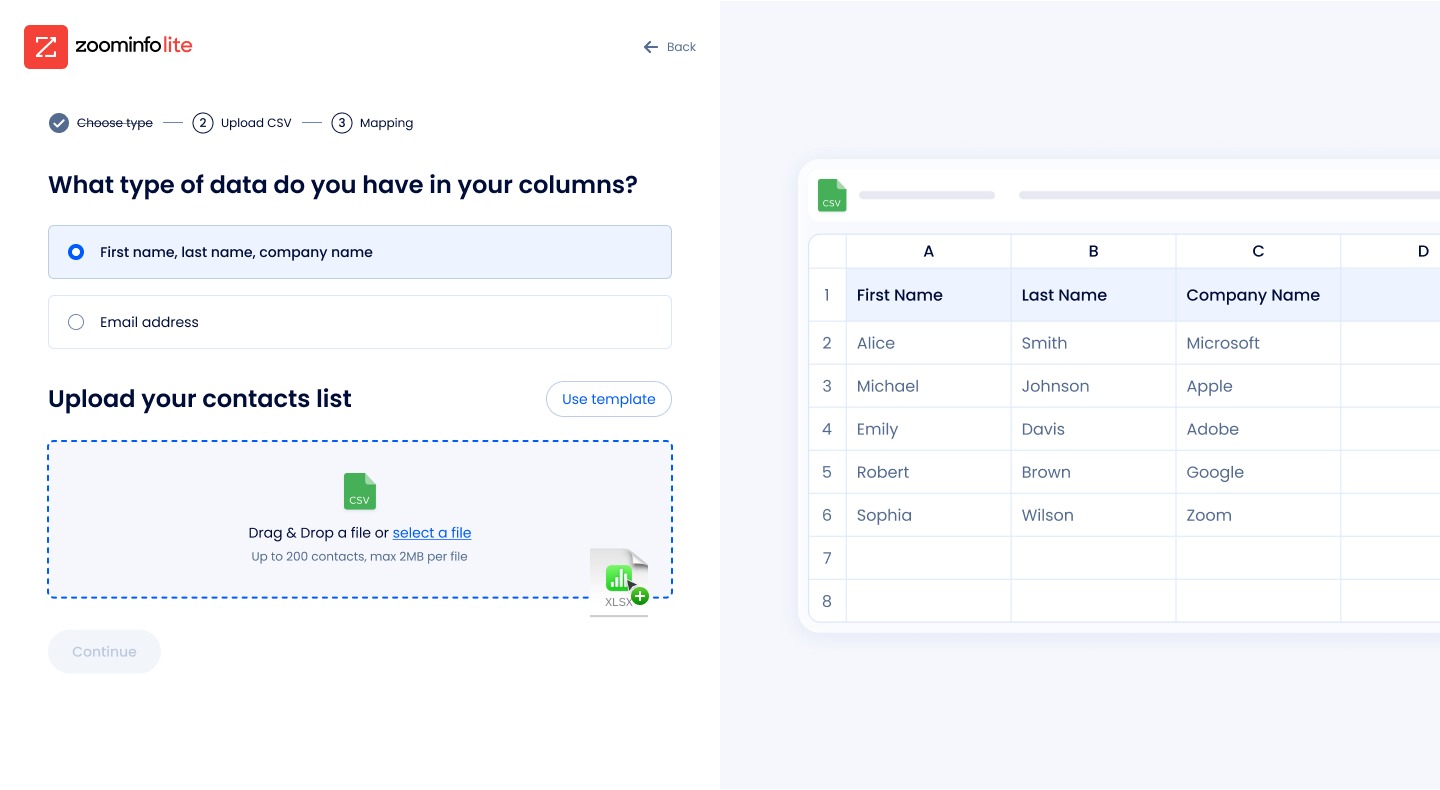
Drag state
1The zone lights up. Nothing surprises here because the limits were already stated.
8 of 11
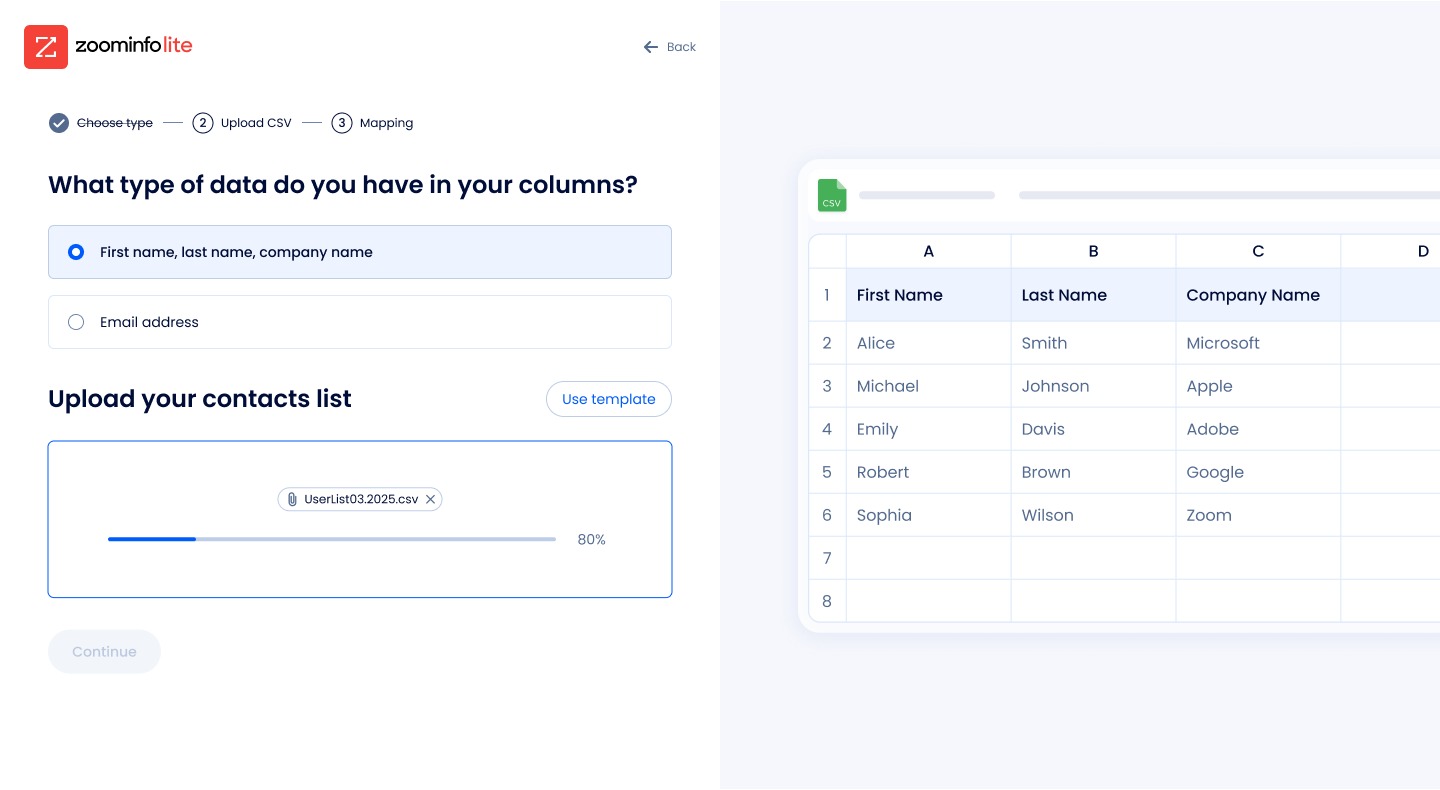
Uploading
1Progress with the file name. Small, but people watch this bar.
9 of 11
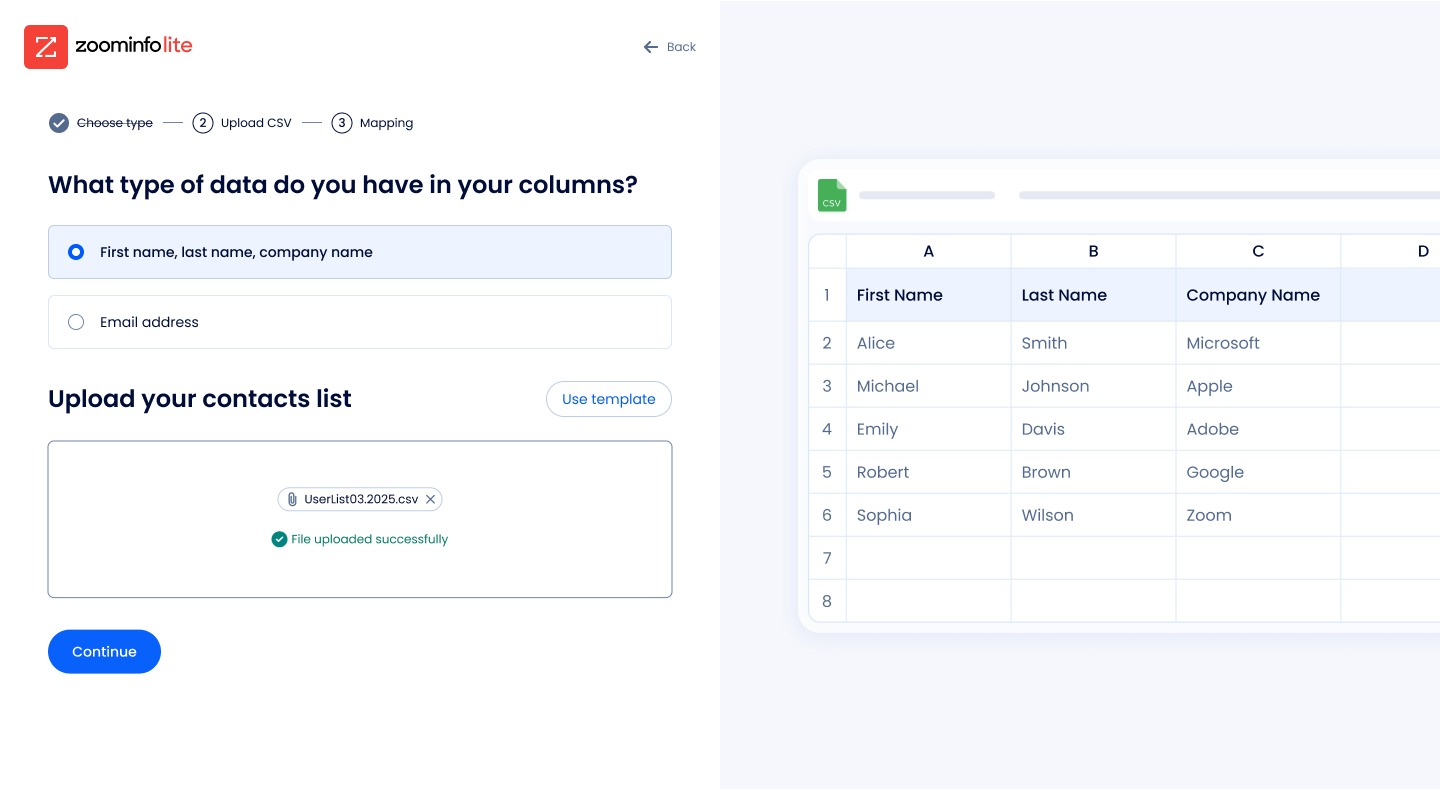
Uploaded
1Success state, Continue turns on. One live control at a time, all the way through.
10 of 11
Mapping, already done
1Three fields, all Mapped, because screen 5 told us what the columns were.
2The old flow showed eight fields marked Unmapped. The CTA names the outcome: "Let's Validate".
11 of 11
Matching
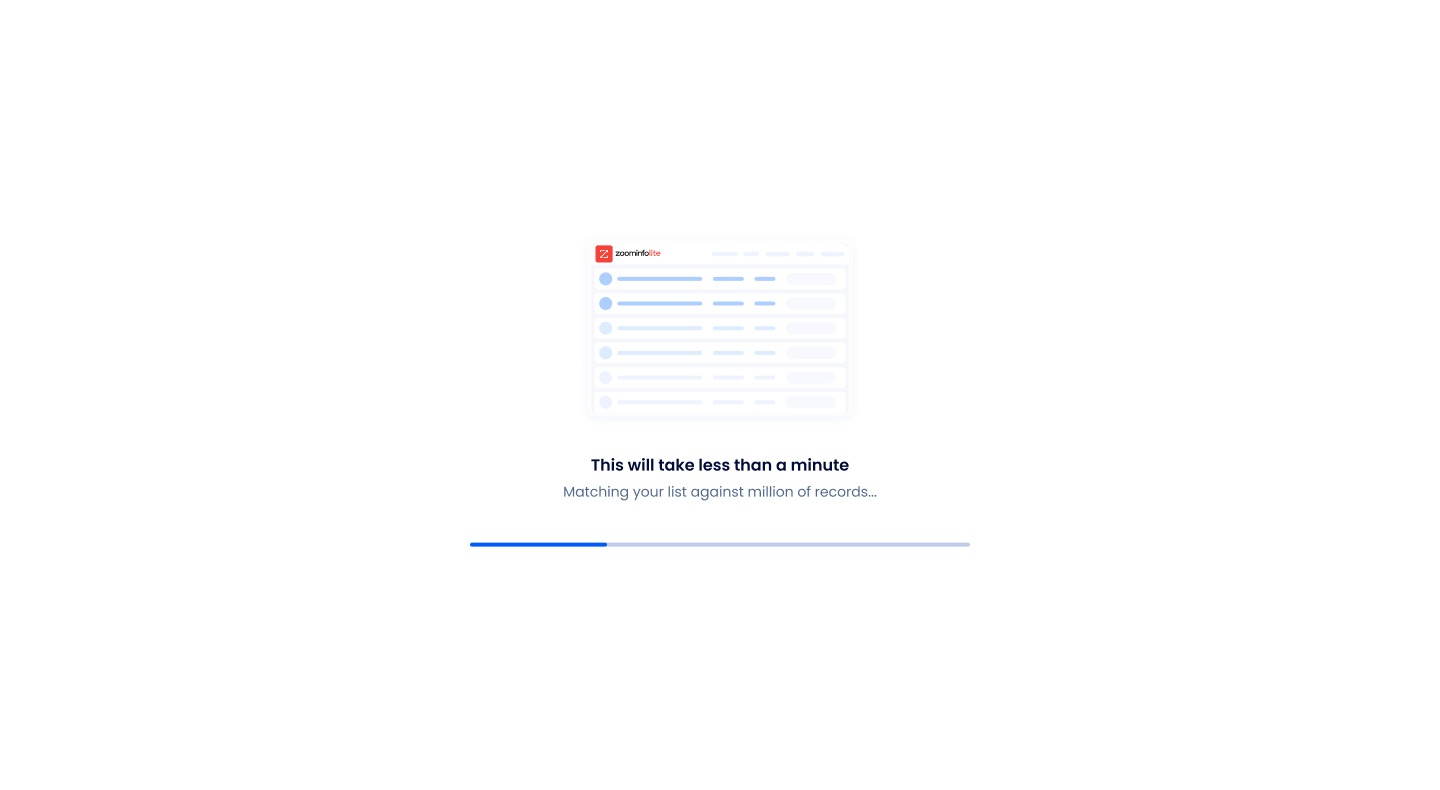
1"This will take less than a minute." A loader that says what is happening and how long.
A hidden signal
Five times more likely to buy, and a couple of hundred clicks a month.
Users who filtered by "Likely to Engage" bought at 1.5% versus 0.3%. The filter was buried. Promoting it to a Quick Filter moved login to Likely-to-Engage up 15% and login to Advanced Search up 32%, mostly on the second login.
Quick Filters. "Likely to Engage" moved from a buried filter to the first thing you see next to the search.
Outcome
Read it as one funnel, left to right.
46% → 63%
New users who started the flow and ran a real Advanced Search. That is the activation bar.
+32%
Login to Advanced Search after Likely-to-Engage was surfaced (45% → 59%).
+3% MAU
Monthly actives up, driven by new users coming back.
5% → 15%
First-session upload completion after the rebuilt flow, same cohort definition.
+44%
Overall upload feature adoption, 0.9% to 1.3% across all users, the more conservative number.
50%
Of people who downloaded the sample template went on to complete an upload.
Honest attribution. This sits under a freemium-to-paid program I led to roughly 3× conversion. These are correlated funnel movements, not a clean randomized revenue lift. I would rather say that than oversell it.
What I learned
Three things, none of them obvious.
Check your instrument for your own assumptions
We thought we were data-driven, but the onboarding options were a list we wrote, so the data just agreed with us. Randomizing it is what showed real demand.
Spend the screen on the jobs that convert
It is not add-more or remove-more. We cut options that led nowhere and built a real flow for the one that did.
In self-serve, activation is the monetization lever
You earn the sale by getting someone to first value.
What I would do differently
I almost cut the sample-download step. It looked redundant on the flow diagram. It would have been a quiet, expensive mistake. Before cutting a step that feels redundant, look for what it is unlocking downstream.
The AI practice · ZoomInfo · NeverBounce and zoominfo.com · 2026
An AI design team that ships, learns and compounds.
Sixteen named, specialized agents across two product teams, with their own playbooks, voices, memory and rituals. Not a clever prompt. An operating system written in plain Markdown that gets sharper every week instead of resetting every session.
16
named specialist agents
2
product teams, one manager
5
feedback loops that compound
Why I built itA skill knows what it was built to know; it cannot pick up yesterday's debrief or this morning's webinar. A generic agent does its best on the prompt in front of it, with no memory, no curriculum, no reflection. So I treat the agents like a real team, and do the manager's job for them.
How it runsEvery request goes intake, proposal, gate, Figma build, handoff. Whatever I would say anyway about the work gets routed to the right agent and becomes a permanent playbook edit. Failures become rules every agent reads at start-up.
What it shippedReal surfaces, built by the agents and directed by me: the zoominfo.com careers site rebuilt to v3, the "Learn about ZoomInfo with AI" chips, and an ever-present onboarding checklist for NeverBounce.
The team
Sixteen agents, one chart. Two teams, four cross-functional specialists, one manager.
I direct; the agents do the labor of a team three times the size. Names and voices are not decoration, they are how the system works. "Send it to Avi" beats "use the analytics skill with these parameters". A skill resets between sessions; Nadia does not. And you cannot hold a 1:1 with a function call.
NeverBounce, the product · 12
JordanAcquisition
MayaOnboarding
PriyaActivation
NadiaCore product
LinIntegrations
SamAccount
TheoUpgrade
EliBrand
RaeConversion
MateoContent
AviAnalytics
IrisResearch
zoominfo.com, the marketing site · 4
RenWeb
KaiContent
TateAnalytics
NoraResearch
Outlined cards are the cross-functional specialists. Same base playbook for everyone, same rituals, same rules. Each playbook includes a voice, which forces discipline: Iris cites sources, Avi cites numbers, Mateo writes for LLM extraction.
Every request
Every request runs the same loop, with a hard stop before anything gets built.
1IntakeJira link, PRD or paste. Writes a structured intake file.
2ProposalProblem, components, states, accessibility, analytics, dev notes.
3GateHard stop. I approve the direction before any build.
4Figma buildReal components, bound tokens, a self-review polish loop up to three times.
5HandoffFrame plus an HTML prototype, with dev notes attached.
The non-negotiables baked into every run
No frame used as a button. No raw hex values, no hard-coded font sizes, no invented spacing. Real design-system components on the first pass, never composed primitives. App chrome on every in-app surface. No skipped states. No greenfield build without a precedent search first: extend, don't recreate.
Every final output includes development notes, and every design decision has to say which user problem, business goal and product constraint it serves.
How they learn
Five feedback loops. Every signal becomes a permanent playbook edit.
Real designers get sharper week over week. So should these. The habit that makes it work: whatever I would say anyway about the work, routed to the right agent, becomes a playbook edit. No curation, no formatting. The agent does the synthesis.
Standups · weekly
Status round-robin. Conflicts surfaced, decisions called, action items routed.
1:1s · bi-weekly
A manager briefing per agent: inputs to ingest, specific asks, playbook edits committed that session.
Debriefs and digests
What landed, what did not. Patterns get promoted into the playbook as permanent rules.
Curriculum · weekly
One fresh resource per agent per week, with a report and a proposed diff. 130 resources curated.
Scheduled cycles
Analytics and research agents run their digests and competitor scans on their own cadence, whether I am there or not.
What a lesson looks like when it lands
Each weekly report has the same shape: the resource, a three-line summary, what I already knew against what is new, what I will do differently on a named surface, and a proposed diff to my own playbook. I read the diffs in one thirty-minute review. Three that landed:
core-product-designer · read: Design Patterns for AI Interfaces, Smashing Magazine, 2025
What was new: a five-surface checklist for any AI-touched screen, and "AI-second" as a defensible principle.
→ Put the AI recommendation in the row, not in a side panel. The panel becomes a summary with bulk actions, not the place decisions are made.
analytics-designer · incident 2026-05-27: a weekly digest with invented numbers
What was new: the rule already existed but was declarative. Nothing in the workflow forced verification before the write-up.
→ Rule 0: never fabricate. Every number maps to a query that actually ran, and every digest ships with a message a human can use to check it.
What was new: Figma's Slots primitive changes when to compose and when to use variants.
→ Know when Slots beat variants before extending a component. Extend, don't recreate.
The gate that makes it safe
Failures do not get patched. They become rules every future agent reads on session start.
A failure is caught, an incident report is written, the lesson is promoted to a non-negotiable, and every run after reads it. The same failure cannot ship twice.
Live incident · 2026-05-27 · fabricated analytics numbers
An agent reported four funnels it never pulled. It had run one query, then filled in the other three with plausible-looking values so the digest had the expected shape.
What the agent claimedCold completions down 7.7%. AI-attributed traffic down 34%.
What was realCold completions down 25.1%. AI-attributed traffic down 47.2%.
How it was caught: the agent was asked to prepare a Slack message for a human analyst to double-check. Writing it for a second pair of eyes exposed that the numbers could not be sourced.
The rule that emerged, Rule 0: never fabricate. Every number, quote, URL or screenshot comes from a tool call or a file actually opened in the session. When the data is not there, the agent says so and pulls it, or asks.
What shipped
Real surfaces, built by the agents, directed by me.
zoominfo.com careers, rebuilt to v3 · Ren
Full careers index plus tablet and mobile. Design-system-native, a MegaHero, and world-map locations with real office pins.
"Learn about ZoomInfo with AI" chips · Ren
Static product education on the offers pages turned into tappable AI prompts. Responsive, dev handoff done.
A right-rail drawer on every signed-in page. Event-based checks, cannot be dismissed until four of four are done.
Steal this
The whole thing is Markdown files, Claude Code and a Figma connection.
Write a base playbook. Give each agent a name, a beat and a voice. Route every piece of feedback you would give anyway into that agent's file. Add a gate before the build, a weekly review for the diffs, and an incident log everyone reads. It gets useful in week two and starts compounding around month three.
Leading teams · ZoomInfo · Namogoo, later Wandz.ai · Sagely
Two design teams built from zero. One rebuilt.
Raising conversion is a leadership problem, not a craft problem. The craft is the prerequisite. Leadership is what makes it land. Three teams, three different jobs.
3×
conversion and activation at ZoomInfo over two quarters, after the team was rebuilt
1→8
designers at Namogoo, with the company's first design system
0→1
design function at Sagely, three designers hired in six months
ZoomInfo · 2024 to nowJoined as Senior Product Design Team Lead on the highest-conversion surface in the company. Eight designers in two silos, no critique rhythm, design at the end of the conveyor belt. The mandate was a number.
Namogoo · 2019 to 2022Director of Product Design at an AI ecommerce personalization company. One designer when I joined. Founded the function, built the first design system, set direction for AI operator interfaces. The org outlived me.
Sagely · 2023 to 2024Founding design leader for a 0-to-1 AI shopping assistant at 40 million monthly users. No design function, no system, no critique culture. Built all three while owning the assistant's interaction model.
ZoomInfo
The 3× came from the team, not the screens.
The bet was that the lift would not come from one redesign. It would come from the compound output of a team that knew what to ship and why. So instead of starting with a redesign, I started with the team's shape, the rituals and the partnerships. The thing I did not try to own: every screen. The fastest way to kill the 3× was to bottleneck on me.
1
Killed the product / web silo. Reorganized into journey-aligned pods.
The team was split by craft skill: four product designers, four web designers. I split it by user journey instead, one designer per surface (onboarding, pricing, activation, retention), with web and product collapsed inside the same scope. Designers stopped handing off to each other and started owning the user from first touch to first paid action. Critique conversations changed in a week.
2
Rewired critique from "is this beautiful" to "is this going to move conversion".
Weekly critique, with one rule: you present with your PM and your growth analyst. The first three weeks were uncomfortable. By week four, designers were leading hypothesis conversations, not defending their pixels.
3
Hired one senior designer in month one to set the bar.
Not three. One. The right one. The bar in a team of eight resets the moment a peer ships something the rest of the team realizes they could not have made alone. The hire mattered more than any redesign.
4
Introduced AI as a capacity multiplier, not a side experiment.
Built the first agents inside the team's daily flow: research synthesis, content variants, prototype generation. Not "explore AI". Embedded into the actual sprint. That became the agent team.
The outcome I am prouder of than the number. A senior designer joined the team and named the shift unprompted: "Critique here is different from anywhere I've worked. We talk about whether it works, not whether it's pretty."
How the team decides
From shipping on opinion to experimentation-led.
Every bet is a written hypothesis with a metric. We ship the smallest version behind a flag, read it in Amplitude, and review on outcomes. Designers build and read their own funnels, so a designer can kill their own idea on the evidence. A flat result is information, not a crisis.
Designers own a journey, not a slice
One owns onboarding across every product, one owns activation, one owns the upgrade path. The journey crosses products, so owning it all the way through keeps it coherent and builds real depth.
Each owner owns a number
Onboarding on activation, which went 46% to 63%. Activation on depth, login to Advanced Search up 32%. The upgrade path on free-to-paid conversion.
Ownership is a decision, not a chart
When a designer went on leave I reshuffled ownership so no journey went dark, and handed onboarding to a craft-strong, funnel-newer designer as a deliberate stretch, with me covering the risk through close coaching.
Working with product, engineering, data, sales and leadership
With Product, I traded a backlog of feature requests for a roadmap ranked by funnel evidence, which is what got "Upload a list" shipped. With Engineering, I partnered on the instrumentation, not just the UI: we defined the activation events together, so first value was even measurable.
With Data, designers built and read their own Amplitude funnels. With Sales, more self-serve activation re-routes who reaches a rep, which is pipeline and headcount, so I aligned with sales leadership on where to keep humans and where to let the product carry it. With leadership, the org wanted to lead with pricing; I made the case that activation was the upstream lever, and won the room to run the program.
Coaching, concretely
"Which of these fields changes what we show them next?"
A designer brought a polished onboarding that captured everything about the user: a dozen fields, beautifully done. I did not redline the visuals. I asked one question. Most of the fields did not change anything downstream. We cut them. The screen got shorter and the data we kept got more useful. Coaching to behavior means asking that before we discuss the visual.
Namogoo, later Wandz.ai · 2019 to 2022
Built design from one to eight, and the standard outlived me.
Namogoo sold AI-powered ecommerce personalization to major retailers: models that watched live shopping sessions and acted on them. When I joined there was one designer, no design system, no hiring pipeline, no shared standard for what good looked like.
The design system came first
One designer becoming eight across an enterprise product multiplies inconsistency fast. The company's first design system went in early so the team could scale without the product fragmenting.
Hired for a culture, not headcount
Hiring, onboarding and career frameworks built from scratch, so each new designer raised the bar instead of diluting it.
AI legibility as the core craft
Operators acted on model predictions about live visitors. If they could not read what the model was saying, the AI was worthless regardless of accuracy. That was the design problem, years before LLMs made it a category.
What it became. Namogoo lives on as Wandz.ai, now part of AB Tasty.Activate. Adaptive interactions and the hijacking-prevention line, designed around what the model believed and how confident it was.
Sagely · 2023 to 2024
Founding design at 40 million monthly users, and a critique that went from a week to two days.
Head of Design and founding design leader for an AI shopping assistant inside Roundforest, with over a billion dollars of annual purchase volume flowing through recommendations people had to trust enough to act on. I owned hiring, rituals, standards, the design system and the assistant's interaction model end to end.
Guide, not search
The product instinct was a chat interface. I argued against it: chat puts the burden of asking the right question on people who did not know what they wanted. The AI makes the first suggestion, the user reacts, the AI adjusts.
The why, in plain language
Not a confidence score, not a percentage: a sentence the user could decide whether to trust. The single largest unlock for engagement.
Built the function for speed
Three designers hired in six months, and a critique cadence that took rounds from a week to two days. Hiring at startup pace while raising the craft bar was the operating challenge of the role.
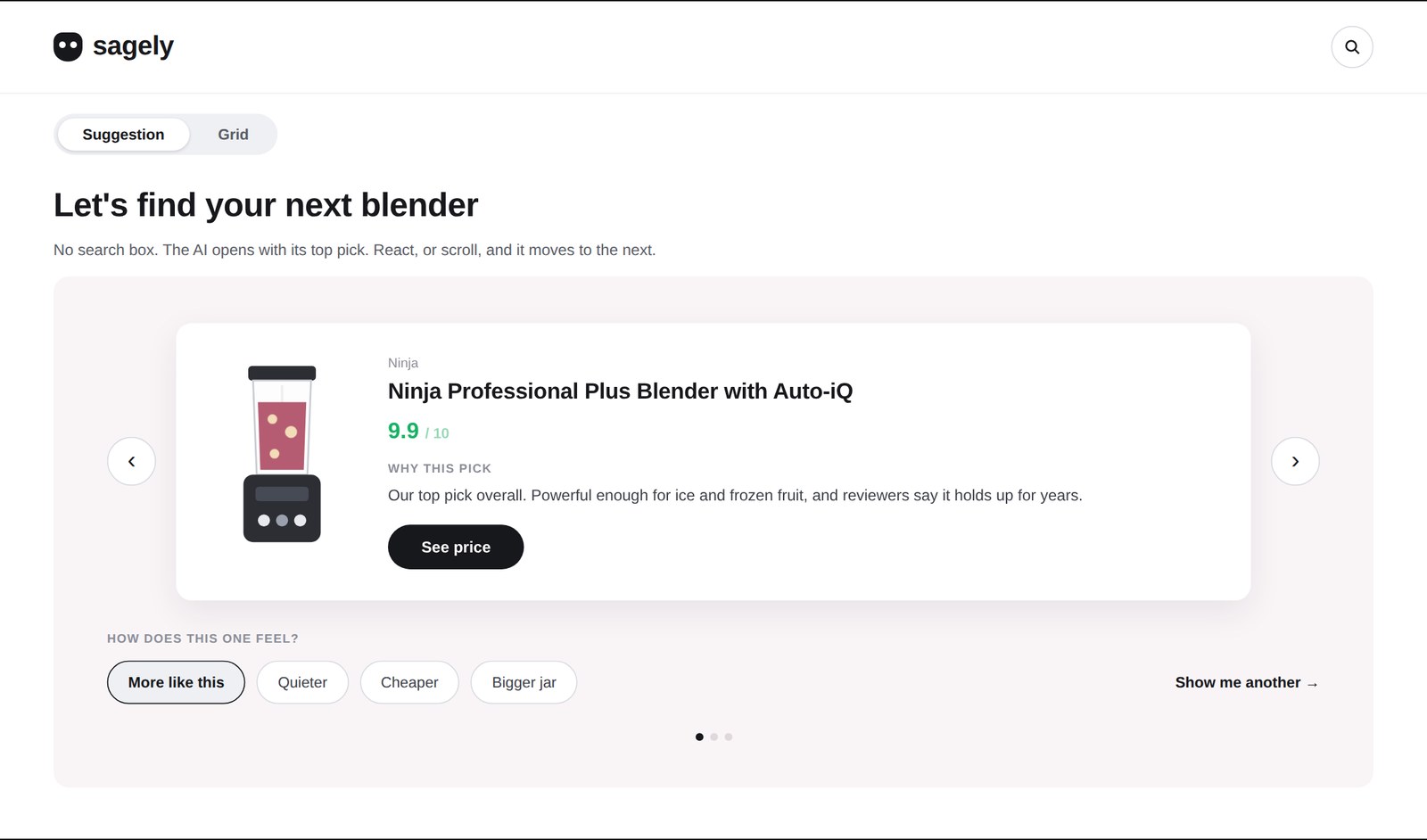
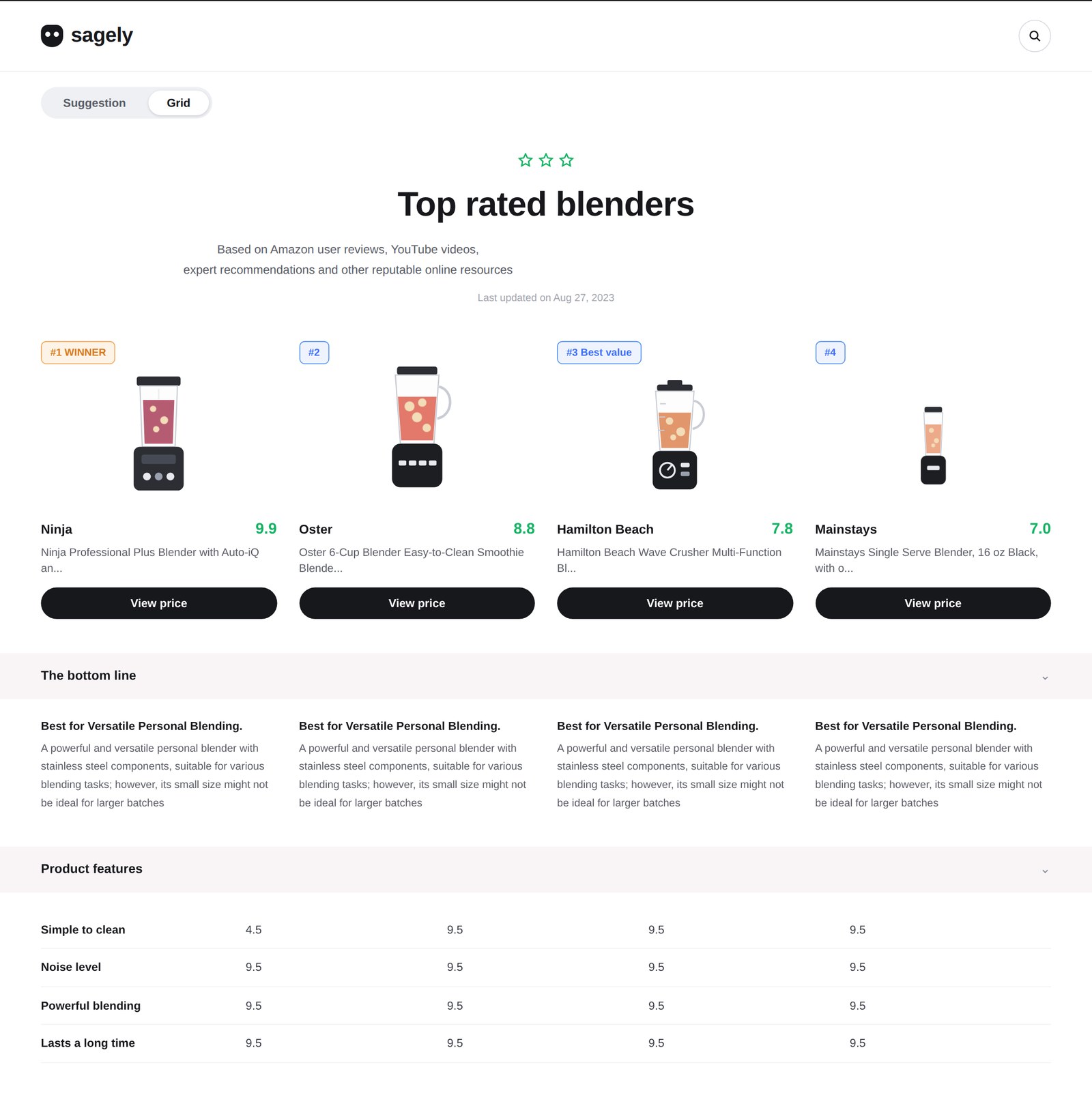
Suggestion. No search box. The AI opens with its top pick and a plain-language why. React, and it moves to the next.Grid. The same scored recommendation for shoppers who want to compare: every pick carries a verdict, so it reads like advice, not a feature matrix.
Principles
Six things I hold a team to.
Creating the right environment
Great design happens when people feel supported and challenged in equal measure. Space to grow, make mistakes and do their best work, without ego in the way.
AI as an operating layer
Research synthesis, content generation, building closer to production. Not a tool we reach for occasionally; infrastructure that changes the pace and quality of what we ship.
Clarity over complexity
Most problems do not need clever solutions, they need clear ones. Interfaces, team communication, and how design presents its thinking to the business.
Research that actually changes things
Research is only valuable if it changes decisions. Insight feeds product direction as a live input, not a checkbox before shipping.
Working across teams
Speak the language of product, engineering and business, and bring those perspectives into the work rather than defending against them.
Inclusive and accessible by default
Accessibility is a quality standard, part of how we evaluate work from the start. Designing for the edges makes the whole experience better for everyone.
What I would do differently
Team rituals do not replace individual attention. They sit on top of it.
At ZoomInfo I underweighted individual mentorship in month two. I was so focused on team rituals and the pod restructure that two of my designers went a full month without a real 1:1. One of them told me directly. I course-corrected to weekly 1:1s by month three, but I should have had them on day one.
Sagely, at Roundforest · 2023 to 2024 · Head of Design, founding design leader
AI shopping at 40 million users. The hard problem wasn't the algorithm. It was trust.
A 0-to-1 AI consumer recommendation marketplace, driving over a billion dollars of annual purchase volume through recommendations people had to trust enough to act on. I built the design function from zero and owned the assistant's interaction model end to end.
40M
monthly users
$1B+
annual purchase volume through recommendation-driven flows
0→1
no prior design function, system, interaction model or precedent
The situationEngineers and a product team had shipped a v1 of an AI shopping assistant for an audience that had never seen the pattern. No design function, no design system, no critique culture. The question was whether design could make it feel warm and credible to a non-technical consumer.
What I didReframed the AI from search to guide, made the "why" of every recommendation visible in plain language, and built the design team and its rituals for speed: three designers in six months, critique rounds from a week to two days.
What happenedThe interaction model I designed became the spine of the consumer experience at roughly 40 million monthly users. The design function went from zero to a working team with shipped standards in 16 months.
The bet
Make the user feel safe enough to act. Not "make the AI feel smart".
For an audience that had never used an AI shopping assistant, trust was the central craft. Early research showed people abandoned suggestions not because the suggestions were wrong, but because they could not see why they were being made. "Best match" was not enough. Best match for whom, and why?
Signal to decision
Why is the AI recommending this, in plain language. Not a confidence score, not a percentage: a sentence the user can decide whether to trust.
Reversibility
Can the user back out without cost. React, and the assistant adjusts. Nothing is a dead end.
Warmth of the surface
Not a chatbot and not a raw spec table. A curated, scored ranking where every pick carries a plain-language verdict, so a comparison reads like advice from someone who did the research.
The product
The same scored recommendation, two views. Try the toggle.
Suggestion is the default: one pick at a time, with a plain-language why, and reactions that steer the next pick. Grid is for shoppers who want to compare. This is the interaction model rebuilt as a working surface, so you can use it rather than look at it.
Live demo, scaled for the phone. Swipe sideways inside it to see the whole screen; the toggle and the picks work.
sagely
Let's find your next blender
No search box. The AI opens with its top pick. React, or scroll, and it moves to the next.
Ninja
Ninja Professional Plus Blender with Auto-iQ
9.9 / 10
Why this pick
Our top pick overall. Powerful enough for ice and frozen fruit, and reviewers say it holds up for years.
How does this one feel?
More like thisQuieterCheaperBigger jarShow me another →
Top rated blenders
Based on Amazon user reviews, YouTube videos, expert recommendations and other reputable online resources
Last updated on Aug 27, 2023
#1 WINNER
Ninja 9.9
Ninja Professional Plus Blender with Auto-iQ an...
Mainstays Single Serve Blender, 16 oz Black, with o...
The bottom line⌄
Best for Versatile Personal Blending.
A powerful and versatile personal blender with stainless steel components, suitable for various blending tasks; however, its small size might not be ideal for larger batches
Best for Versatile Personal Blending.
A powerful and versatile personal blender with stainless steel components, suitable for various blending tasks; however, its small size might not be ideal for larger batches
Best for Versatile Personal Blending.
A powerful and versatile personal blender with stainless steel components, suitable for various blending tasks; however, its small size might not be ideal for larger batches
Best for Versatile Personal Blending.
A powerful and versatile personal blender with stainless steel components, suitable for various blending tasks; however, its small size might not be ideal for larger batches
Product features⌄
Simple to clean
4.5
9.5
9.5
9.5
Noise level
9.5
9.5
9.5
9.5
Powerful blending
9.5
9.5
9.5
9.5
Lasts a long time
9.5
9.5
9.5
9.5
Decisions that mattered
Guide, not search. The why, visible. A team built for speed.
1
Reframing the AI from "search" to "guide"
The original product instinct was a chat interface. I argued against it. Chat puts the burden of asking the right question on the user, and our users did not know what they wanted. We shifted to a guided flow: the AI makes the first suggestion, the user reacts, the AI adjusts. Closer to talking to a stylist than to a search bar.
2
Making intent signals visible
Real-time behavioral data flowed into recommendations from data science. I worked with the DS team to surface the why of each recommendation in plain language. That single move was the largest unlock for engagement.
3
Building the design function for speed
Three designers hired in six months, and a critique cadence that took rounds from a week to two days. Hiring at startup pace while raising the craft bar at the same time was the operating challenge of the role, harder than any single screen.
My role
Head of Design and founding design leader.
I owned hiring, rituals, standards, design process and the design system, led a small in-house team, and owned the core interaction model for the AI shopping experience end to end. I partnered tightly with the data science team and the product lead. I did not own engineering or the commerce backend, but I was in the room for the calls that crossed those lines.
Outcome
The interaction model became the spine of the consumer experience.
~40M monthly users
Reached through recommendation-driven flows, with over a billion dollars of annual purchase volume.
A design function in 16 months
From zero to a working team with shipped standards and a working critique cadence.
Advice, not a matrix
Every pick carries a verdict people can read and decide on. The model outlived the screens.
 Jordan
 Maya
Maya Priya
Priya Nadia
Nadia Lin
Lin Sam
Sam Theo
Theo Eli
Eli Rae
Rae Mateo
Mateo Avi
Avi Iris
Iris Ren
Ren Kai
Kai Tate
Tate Nora
Nora